Quick answer: 100001 Network is a free, independent help site for Piso WiFi customers and vendo owners in the Philippines. A small independent team writes every guide from official sources first, compares several owner reports, labels anything unconfirmed and updates pages when things change. 100001 Network is not affiliated with any vendo brand, seller or internet provider. Spotted a mistake? Tell us through the contact page.
100001 Network started because the most common Piso WiFi question, what to type to open the vendo page, was getting confusing answers online. People were told to try five-number addresses like 1.0.0.0.1, or they landed on router guides written for other countries. This page explains who we are, what we cover, how every guide is researched and checked, and how you can help us keep it right.
Who We Are
100001 Network is run by a small independent team. 100001 Network is not a vendo company, an installer, a reseller or an internet provider, and we do not sell machines, licences, parts or setup services. Our only product is the guides themselves, and they are free to read on any phone, including one running on a few minutes of paid vendo time.
You will not find staff profiles or job titles on this page. Instead, 100001 Network tries to show its work: where each fact comes from, how sure we are about it, and when a guide was last updated. We think that is the part that should earn your trust, and it is the part you can check for yourself.
About our name: the 100001 Network name is easy to remember, but typing 100001 or 10001 into a browser will not open a Piso WiFi page. While connected to the vendo Wi-Fi, type 10.0.0.1 with the dots, in the address bar rather than the search box. Our 10.0.0.1 login help page lists the typos that send people to a search page instead.
What 100001 Network Covers
Everything here is about coin-operated Wi-Fi, known locally as Piso WiFi. It grew out of the Pisonet, the coin-operated computer rental found in many Philippine towns. A vendo is a box with a coin slot, a small computer and a Wi-Fi access point. Our guides follow the questions people ask about it most.
- All Piso WiFi guides in one hub, sorted for customers and owners.
- The correct 10.0.0.1 address and why 1.0.0.0.1 or 10.0.0.0.1 never load.
- How customers insert coins, use vouchers and read the 10.0.0.1 Piso WiFi portal.
- How pause time works and why paused minutes sometimes disappear.
- The 10.0.0.1 admin login, reported default passwords and a security checklist for owners.
- Popular vendo software, including LPB Piso WiFi and Wifi5 Soft.
- How to plan, build and run a Piso WiFi vendo business.
What we leave out matters just as much. We do not publish cracked licences, ways to bypass a coin slot, or apps that promise free time. We also skip general router topics unless they help someone standing in front of a vendo, because a page that tries to cover everything usually helps nobody.
Who Our Guides Are For
Two groups of people search for Piso WiFi help, and they need very different answers. Customers want the internet working in the next minute. Owners need setup, settings and security advice they can trust with a small business. We keep the two apart so nobody has to wade through steps meant for the other side.
| Reader | Usual questions | Good place to start |
|---|---|---|
| Customers | Portal will not open, coins not credited | Customer portal guide |
| Customers who pause | How to pause, resume and keep minutes | Pause time guide |
| Future owners | Costs, parts, location, permits | Vendo business guide |
| Current owners | Admin login, passwords, rates, vouchers | Admin login guide |
| LPB or Wifi5 Soft owners | Licences, menus, pause settings | LPB or Wifi5 Soft guide |
Every 100001 Network guide makes the split obvious. Customer steps use 10.0.0.1, the portal where you insert coins and check your time. Owner steps use 10.0.0.1/admin, which customers never need. When a section is only for owners, its heading says so, and the quick answer at the top tells each reader where to jump.
Our 7 Promises to Readers
These are the editorial standards behind every 100001 Network guide. They are simple on purpose, so you can hold us to them. If you ever find a page that breaks one of these promises, that is a mistake we want to hear about.
| Promise | What it means in practice |
|---|---|
| Official sources first | Vendor sites, published standards and government pages come before anything else |
| Several reports, not one | A single forum post is never enough to state something as fact |
| Honest labels | Unconfirmed details are marked reported, version dependent or unverified |
| Plain, phone-first writing | Quick answer at the top, short steps, simple English and a Taglish summary |
| No hacks or free-time tricks | We never explain how to cheat a vendo or enter someone else’s admin panel |
| Independent, no paid placements | No brand, seller or installer can pay to be featured or praised |
| Quick, visible corrections | Errors get fixed and the guide’s Updated date changes |
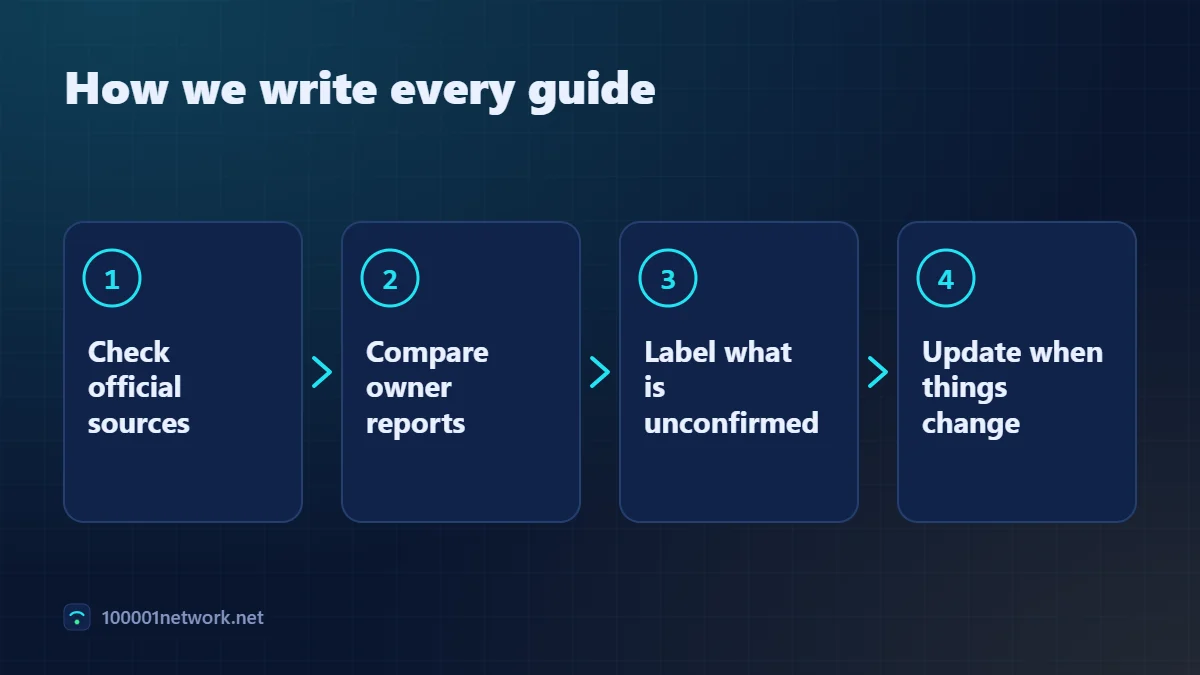
How 100001 Network Researches a Guide
Every guide goes through the same process, whether it covers a two-minute customer fix or a full vendo setup. The steps below are what happens before a page is published and each time it is reviewed later.
- Start with the real question. We look at what people actually type and what readers ask through our contact form.
- Read the official sources. Vendor websites, official blogs and manuals, published standards and government pages come first.
- Collect owner and installer reports. Setup guides, seller instructions and community posts show how things behave on real machines.
- Compare and note conflicts. When two sources disagree, we record both instead of quietly picking one.
- Test what we can. Addresses, common typos and phone settings can be checked directly. If we could not check a step on a live unit, the guide says so.
- Write it plainly. Quick answer first, then numbered steps, tables and a troubleshooting section.
- Check before publishing. Facts are matched against the source list, labels are added, links are tested and safety warnings are reviewed.
- Schedule the next review. Fast-changing details such as licence prices get checked more often.
Which sources count as official
Official means the people who make the product or set the rules. For vendo software, that is the developer’s own website, such as the official LPB site. For network basics, it is a published standard such as RFC 1918, which reserves the 10.0.0.0/8 range, including 10.0.0.1, for private networks. For permits and telecom rules, it is the relevant government office.
Some products have very little official material. We could not find an official website or public manual for Wifi5 Soft, for example, so that guide relies on third-party sources and says so clearly near the top. We would rather admit a gap than fill it with guesses.
When sources disagree
Disagreement is common in the vendo world because software changes often and every seller sets things up a little differently. Reported pause limits for the same system vary from guide to guide, and some settings appear under different menu names in different versions. In those cases we show the common answers, explain why they differ and tell you to check your own screen.
How We Label Facts We Cannot Fully Confirm
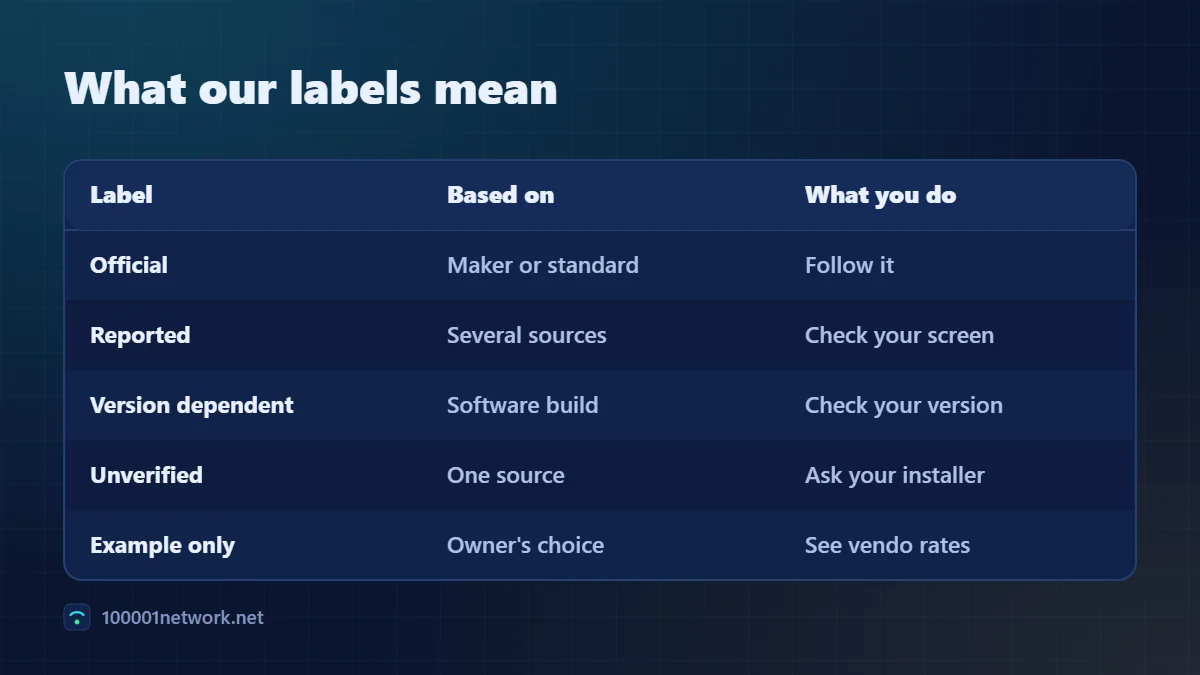
Not every fact is equally certain, and pretending otherwise would put readers at risk of wasting time or locking themselves out of a machine. So 100001 Network guides use a small set of plain labels. You will see these words in sentences, captions and table notes across the site.
| Label | What it means | Example from our guides |
|---|---|---|
| Official | Confirmed by the maker, a standard or a government page | LPB licence prices as listed on the vendor site |
| Commonly reported | Several independent sources agree, but no official confirmation | Default admin logins for some vendo systems |
| Version dependent | Differs between software versions, builds or resellers | Menu paths for pause settings |
| Unverified | Only one source, or sources conflict and we could not settle it | Some newer default passwords |
| Example only | A value each owner sets, shown for illustration | Rates such as ₱1 for five minutes |
| Dated | Correct when checked, likely to change | Prices marked “as listed in October 2026” |
Facts without a label are ones we consider settled, such as 10.0.0.1 having four numbers, or the rule that a vendo portal only opens while you are connected to that vendo’s Wi-Fi. If your screen does not match a labelled detail, trust your screen and the vendo owner first.
Independence and Money
100001 Network is not affiliated with, endorsed by or sponsored by LPB, AdoPiSoft, Wifi5 Soft, TP-Link, any internet provider or any vendo seller. Brand names appear only so readers can find the right instructions. When we compare systems, we describe features and reported issues, not which brand we like best.
- No paid placements. No company can pay to be featured, ranked higher or reviewed more kindly.
- No sponsored guides. Every page is written by us for readers, not for a brand.
- Ads stay separate. When the site shows ads, they sit apart from guide text and never change what we recommend.
- Nothing to sell. We do not sell vendo machines, licences, parts or installation.
- Clear labels if that changes. If we ever add a link that earns a commission, it will be marked where it appears.
Ads are how a free site like 100001network.net pays for hosting and the time it takes to keep guides current. Ad partners such as Google may use cookies, and our privacy policy explains what that means and how to opt out. You can read every guide without creating an account or paying anything.
We will never publish hacks. That includes tricks for free Piso WiFi time, ways to tamper with a coin slot and lists for guessing someone else’s admin password. Getting into a vendo you do not own is unauthorised access and may be a crime under the Cybercrime Prevention Act of 2012. If you own a vendo, our admin guide shows how to lock it down instead.
Corrections and Updates Policy
Vendo software changes often, owners rename buttons, and we make mistakes too. When something is wrong, we want to fix it quickly and openly. You can report any error through our contact form, and here is what happens next, depending on the kind of problem.
| Kind of problem | What we do |
|---|---|
| Typo or broken link | Fix it as soon as we see it |
| Wrong fact, step or price | Correct it, update the date and add a short note if readers may have acted on it |
| New software version | Update the steps and label which version each one applies to |
| A second source disagrees | Add both views and label the detail reported or version dependent |
| Safety or legal concern | Remove or rewrite the section first, then review the whole page |
Beyond reader reports, our goal is to review every guide at least twice a year, and sooner for fast-moving details such as licence promos. Each guide shows the date it was last updated near the title. Dated facts like prices also carry the month we checked them, so you can judge how fresh they are.
Accessibility and Speed
Most readers arrive on a phone, often on vendo time paid by the minute or on prepaid data. Every second spent loading costs something. So 100001network.net is built to be light, clear and easy to use on a small screen, even on a weak connection.
- Mobile first. Layouts are designed for small screens before larger ones.
- Light pages. Illustrations are compressed and kept to what helps the steps.
- Answer first. Each guide opens with a quick answer, so many readers can stop there.
- Plain language. Short sentences, simple English and a Taglish summary box.
- Readable structure. Headings in order, descriptive image text and tables with header rows.
- Easy navigation. Longer pages include a table of contents.
The 10.0.0.1 links on our pages simply open an address on your own local network. Nothing you type into a vendo portal or admin panel is sent to us, and we never ask for vendo passwords or payment details.
How Readers Can Help
Readers see far more vendos than any small team could, so your reports are one of the best ways to keep 100001 Network guides accurate. A short, specific message helps the most. Here is what is useful to include when you write to us.
- The vendo brand or software name, and the version number if your screen shows one.
- What your screen actually says, such as the exact button label.
- Which step worked or failed, and what kind of phone you used.
- A link to an official page if you have a source for a correction.
- Topics or questions you could not find answered anywhere on the site.
Please do not send: passwords, voucher codes, GCash or Maya details, or photos of your ID. We also cannot add time to your account, reset someone else’s vendo or recover a password for a machine you do not own. For coins that were not credited, speak to the vendo owner directly.
Maikling paliwanag (Taglish):
- Ang 100001 Network ay libre at independent na site para sa Piso WiFi.
- Hindi kami konektado sa LPB, AdoPiSoft, Wifi5 Soft o anumang ISP.
- Opisyal na sources muna ang tinitingnan namin bago magsulat.
- May mali sa guide? I-message kami sa contact page.
- Huwag magpadala ng password o voucher code sa amin.
FAQs about 100001 Network
What is 100001 Network?
100001 Network is a free, independent website that explains Piso WiFi in plain language. It covers the 10.0.0.1 customer portal, pause time, the owner admin login and popular vendo systems. A small independent team writes and updates the guides for readers in the Philippines.
Is 100001 Network affiliated with LPB, AdoPiSoft or Wifi5 Soft?
No. 100001 Network has no link to any vendo brand, seller, installer or internet provider. We mention brand names only so readers can find the right instructions. For official support or licences, contact the developer or the seller who installed your machine.
Who writes the guides on 100001network.net?
A small independent team writes every guide on 100001network.net. We do not publish staff profiles. Instead, each guide shows where its facts come from, labels anything unconfirmed and displays the date it was last updated, so you can judge the work directly.
How do you check that a guide is accurate?
We start with official sources such as vendor websites, published standards and government pages. Then we compare several owner and installer reports, test addresses and steps where we can, and label anything we could not confirm. Guides are reviewed on a schedule and after reader reports.
How do I report a mistake to 100001 Network?
Use the contact form and tell 100001 Network which page and section is wrong. Include your vendo brand, the software version if shown and what your screen says. Never include passwords or voucher codes. We review every report and update the guide when needed.
Can you add time to my Piso WiFi or reset a vendo?
No. 100001 Network is a help website, not a vendo operator, so we cannot see or change any machine. For missing time or coins that were not credited, talk to the vendo owner. Owners who are locked out should contact their seller or installer first.
How does 100001 Network pay for the site?
100001 Network may show ads to cover hosting and writing time. Ads stay separate from guide text, and no company can pay for a placement, a better review or a mention. We do not sell machines, licences or setup services.
Final Word
Piso WiFi should be simple: drop a coin, get online, and know what to do when something goes wrong. At 100001 Network we work to keep it that way with honest, checked and regularly updated guides. If you spot something we missed, tell us, and we will make the page better for the next reader.