Quick summary: These terms of use are the house rules for 100001network.net. In short:
- Our Piso WiFi and 10.0.0.1 guides are free, general information, not professional advice.
- Use them only on vendos and routers you own or manage. No free-time hacks, no coin-slot tampering, no copying our pages.
- The 10.0.0.1 buttons and the address fixer only open a page on your own local network, and their results are suggestions.
- We give no warranty, our liability is limited as far as the law allows, and questions about these terms go through our contact form.
These terms of use explain the rules for visiting 100001network.net and using its free Piso WiFi guides, tools and illustrations. By using the site, you agree to these terms; if you do not agree, please do not use it. Last updated: October 30, 2026.
We wrote these terms in plain English on purpose. Most of them are common sense: use our guides on equipment that is yours, respect other people’s machines and our work, and double-check anything important. Our privacy policy covers personal data, and our disclaimer covers accuracy and affiliations.
Our Terms of Use at a Glance
Short on time? This table sums up each section in one line. The full terms below are what apply.
| Section | What it means for you |
|---|---|
| Acceptance | Using the site means you accept these terms |
| Who we are | An independent site, not tied to any vendo brand or ISP |
| Information only | Guides are general help, not professional advice |
| Acceptable use | Only access devices you own or manage |
| Tools and buttons | They open your local page; results are suggestions |
| Our content | Share links, but do not copy or scrape our pages |
| Your messages | We may use corrections to improve our guides |
| Links and ads | Other sites and ads are not ours to control |
| Warranty and liability | No promises, and limited liability where the law allows |
| Changes and law | We may update these terms; Philippine law applies |
Accepting These Terms of Use
When you open any page on 100001network.net, read a guide, use the address fixer or send us a message, you accept these terms. They apply to every visitor, whether you are a customer with a few coins or an owner running several vendos. If you do not agree with any part, the simplest choice is to stop using the site.
If you are under 18, please use the site with a parent or guardian’s knowledge, especially before you touch any vendo or router settings at home.
Who We Are
100001 Network is an independent help website for Piso WiFi customers and vendo owners in the Philippines. When these terms say “we” or “us”, they mean the small team behind the site; “you” means anyone who visits it. Our About 100001 Network page explains how we research and update guides.
We are not affiliated with, sponsored by or endorsed by LPB Piso WiFi, AdoPiSoft, Wifi5 Soft, TP-Link, any internet service provider or any vendo seller. We do not sell machines, licences or vouchers, and we do not publish a phone number or physical address. The only official way to reach us is the form on our contact page.
Our Guides Are Information Only
Everything on the site, from our 10.0.0.1 Piso WiFi portal guide to our notes on rates and licences, is general information. It is not professional advice for your particular vendo, network or business. Vendo software, firmware and settings vary between machines and change over time, so steps, menu names and defaults may look different on your device.
- Default logins: the usernames and passwords we list are reported defaults. Sellers and installers often change them.
- Menu paths: button names move between versions, so look for similar wording on your screen.
- Rates and pause limits: each vendo owner sets these. Any numbers we show are examples only.
- Business topics: permits and rules can change, so confirm them with the agency concerned. Our Piso WiFi vendo business guide is a starting point, not the final word.
Always follow the vendo owner’s instructions and the official documentation first. If our guide and your screen disagree, trust the screen and tell us.
Acceptable Use: What You May and May Not Do
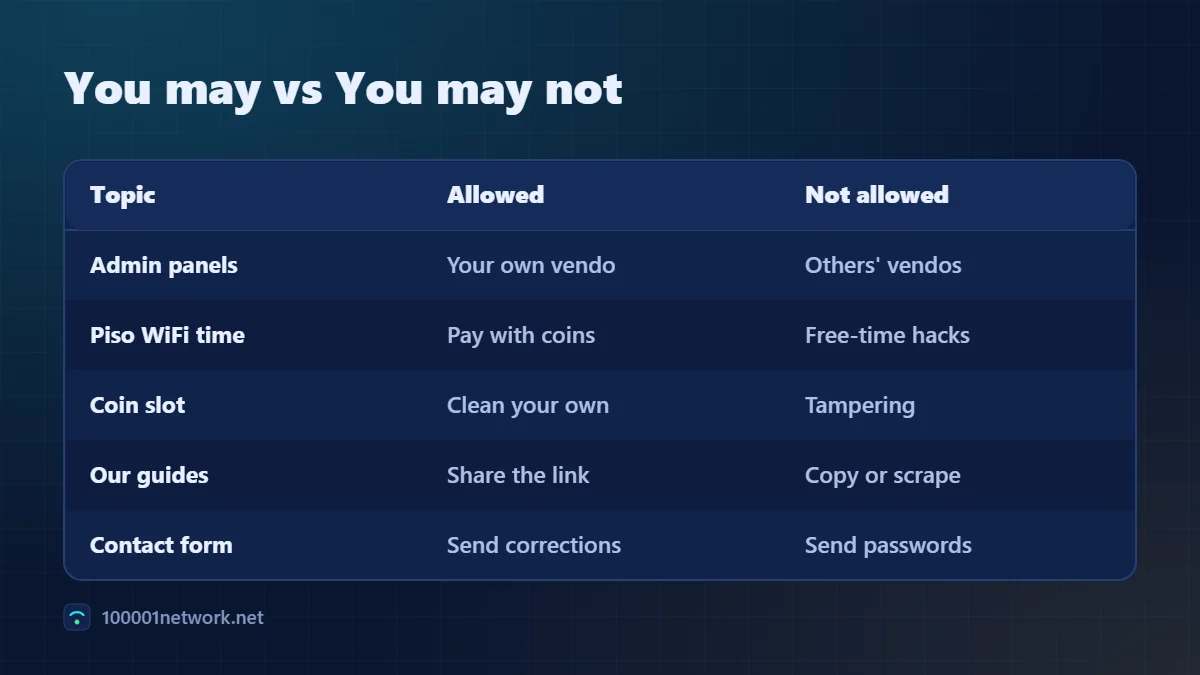
Our guides exist to help people get online and run honest businesses, never to get into someone else’s machine or cheat an owner out of coins. The table below draws the line in everyday situations.
| Topic | You may | You may not |
|---|---|---|
| Admin panels | Log in to a vendo or router you own or are authorised to manage | Log in to, change or disrupt anyone else’s network or vendo |
| Piso WiFi time | Pay with coins or a voucher, and pause if the owner allows it | Try to get free time, bypass payment or take over another session |
| Coin slots | Clean or repair the slot on your own machine | Tamper with, jam or rig any coin slot |
| Our guides | Read, share links and print a page for personal use | Copy pages in bulk, republish them or present them as yours |
| Automated access | Normal browsing on any phone or computer | Scrape, mirror or overload the site |
| Contact form | Send questions, corrections and ideas | Send spam, threats, malware or other people’s private data |
Only Access Devices You Own or Manage
Our admin, reset and settings guides are for owners, installers and people the owner has clearly authorised. Do not use them to guess passwords, open admin pages or change settings on a vendo, router or network that belongs to someone else, even if a default login seems to work.
This is not only our rule. Getting into a computer system without the right to do so can be an offence under the Philippine Cybercrime Prevention Act of 2012, and a vendo is a small computer. If you are unsure, ask the owner first.
No Free-Time Hacks or Coin-Slot Tampering
We do not publish, and will not help with, tricks for free Piso WiFi time. That includes copying another phone’s identity, getting around the login page, faking coin signals or jamming the coin acceptor. Each one takes money from a small business owner, and requests for them get no reply.
No Scraping or Republishing
You may share links to our guides, quote a sentence or two with a link back, and print a page for your own use. You may not copy whole pages, republish our text or illustrations on another site, app, video or social account, or scrape and mirror the site. Do not overload it with requests, test its security without permission or upload anything harmful.
Do not risk it. Opening the admin page of a vendo you do not own, even “just to look”, can get you into real trouble and can break a machine someone depends on for income. If it is not your machine, leave it alone and talk to the owner.
The Address Fixer and 10.0.0.1 Buttons
Some pages include buttons such as “Open customer portal” and “Owner login: 10.0.0.1/admin”, plus an address fixer that turns typos like 1.0.0.0.1 into the right address. These terms treat them as simple shortcuts, not services:
- The buttons only open
http://10.0.0.1orhttp://10.0.0.1/admin, a page on your own local network, usually the vendo you are joined to. It is not a page on our site. - They work only while you are on the vendo’s Wi-Fi, often with mobile data off.
- The address fixer runs in your browser and suggests an address from what you typed. It cannot see your network, so it may be wrong for unusual setups.
- We do not run or see the page that opens. Anything you type there, such as a voucher code or password, goes to that device, not to us.
Because the results are suggestions, check the gateway in your phone’s Wi-Fi details if the usual address fails. Our 10.0.0.1 login help page lists common typos, and the Piso WiFi pause time guide explains what to do once the portal opens.
Intellectual Property
The articles, tables, checklists and illustrations on 100001network.net were written and made for this site, and we own the rights to them unless a page says otherwise. Nothing in these terms transfers those rights to you.
Product and brand names such as LPB, AdoPiSoft, Wifi5 Soft, TP-Link, PLDT and Globe belong to their owners. We use them only to identify the systems our guides talk about, and naming a brand does not mean its owner approves our content. Our illustrations show generic screens, not copies of any brand’s software. If you believe a page uses your work without permission, tell us and we will review it.
Messages and Corrections You Send Us
When you send a question, correction or idea through the contact form, you let us use it to answer you and to improve our guides. If you tell us a menu name changed in a new version, for example, we may check it against other sources and update the page. We will not publish your name or email address with it.
Only send information that is true and yours to share. Never include passwords, MPINs, one-time PINs, bank details or other people’s personal data. We may delete messages that are abusive or spammy, or that ask for help breaking these terms. Our privacy policy explains how we store and handle messages.
Third-Party Links and Ads
Our guides link to other websites, such as vendor pages and reference articles, so you can check facts at the source. We do not control those sites. Their content and own terms are their business, and a link is not an endorsement.
The site may show ads from third parties, including Google. Ads are kept separate from our guides, and advertisers do not decide what we write. Ad partners may use cookies to choose ads, as Google explains on its page about how it uses cookies in advertising. Be careful with any ad that promises free Wi-Fi time or cracked software. Purchases made through an ad or outside link are between you and the seller.
No Warranty
The site, guides and tools are provided “as is” and “as available”. We work hard to keep them accurate, but we do not promise that every detail is complete, current, error-free or right for your machine, or that the site will always be online. You use the information at your own risk.
Limitation of Liability
To the fullest extent the law allows, we are not responsible for any loss or damage that comes from using, or being unable to use, the site. That includes lost Piso WiFi time or credits, lost coins, changed or erased settings, factory resets, a vendo that stops working, or lost sales. Nothing in these terms limits rights that Philippine law says cannot be limited.
We have no access to any vendo, so we cannot add time, refund coins or undo a change. If you are unsure about a step, stop and ask a qualified installer first. This table shows who can usually help:
| Situation | Who can help | Why |
|---|---|---|
| Coins dropped, no time added | The vendo owner | They can check the sales log |
| Paused time disappeared | The vendo owner | They set pause limits |
| Settings broke after a change | Your installer or seller | They know your setup |
| Licence or hardware fault | Software vendor or seller | They issue licences and warranties |
| Modem shows no internet | Your internet provider | The fault is before the vendo |
| Mistake in one of our guides | Us, through the contact form | We fix and update our pages |
What to Do Before Changing Vendo Settings
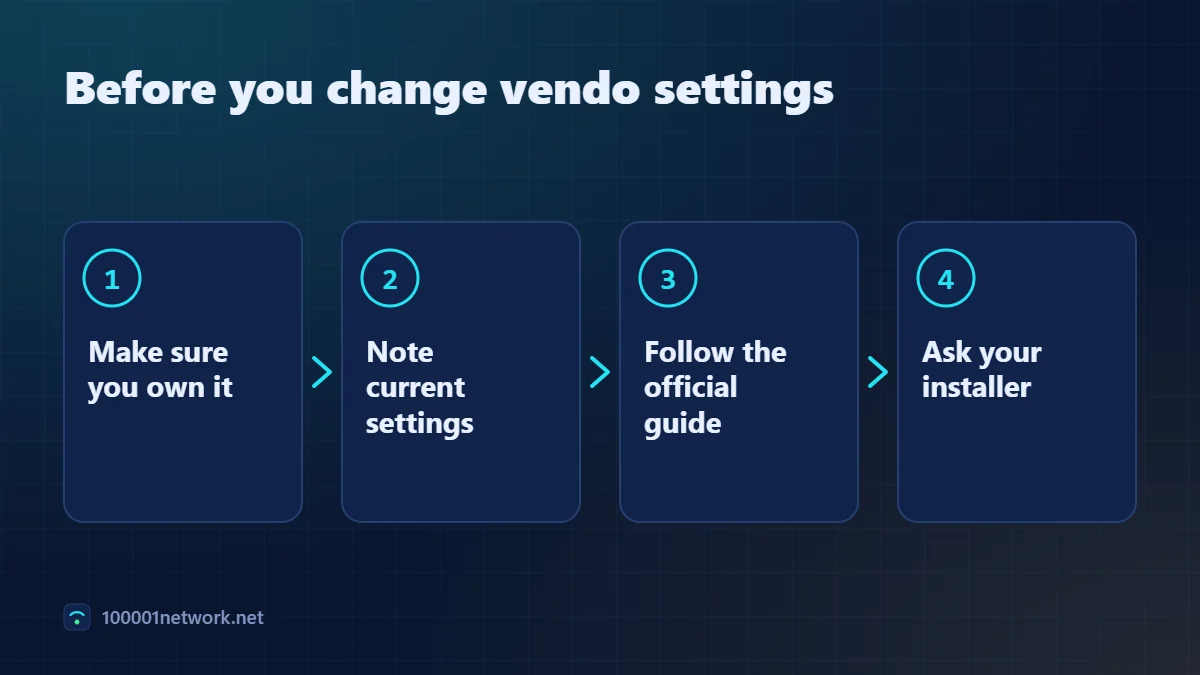
Our owner guides explain how to change rates, Wi-Fi names, pause limits and passwords. Under these terms, any change you make is your own decision, so prepare first:
- Make sure you own it: or that the owner has clearly authorised you to manage it.
- Note current settings: screenshot rates, the Wi-Fi name, pause rules and vouchers, and keep your login safe.
- Follow the official guide: use your vendor’s documentation first and treat ours as a helper.
- Ask your installer: if anything looks different or risky, check before you continue.
- Change one thing at a time: save, then test with a phone.
- Keep a factory reset for last: it usually erases rates, vouchers and Wi-Fi settings.
Our 10.0.0.1 admin login guide explains reported default logins and what a reset usually does. The result of any change depends on your machine and setup, which we cannot see or control.
Indemnity in Plain Words
“Indemnity” sounds formal, but the idea is simple. If you break these terms or misuse our guides, for example by getting into someone else’s vendo, and someone makes a claim against us because of it, you agree to cover the reasonable costs and losses we face as a result, as far as the law allows. You are responsible for what you do with our information.
Changes to the Site and These Terms
Piso WiFi software changes often, so we may add, edit, move or remove guides, tools and pages at any time, including the address fixer.
We may also update these terms at any time. The “Last updated” date in the first paragraph shows the current version. Changes take effect once posted, and if you keep using the site after that, you accept them. For bigger changes, we will try to add a short note near the top.
Governing Law
These terms are meant to be read under the laws of the Republic of the Philippines. If a disagreement comes up, please contact us first. If that fails, it would generally be handled under Philippine law by a court with proper jurisdiction, unless the law where you live gives you rights that cannot be waived.
If a court decides one part of these terms cannot be enforced, the rest still applies. This page, like everything on the site, is general information and not legal advice. For advice about your own situation, please talk to a qualified lawyer.
Maikling buod sa Tagalog:
- Libre ang mga gabay namin, pero pang-impormasyon lang ang mga ito.
- Gamitin lang sa vendo o router na sa iyo o pinapamahala sa iyo.
- Bawal ang free time hack, pandaraya sa coin slot at pagkopya ng aming mga pahina.
- Ang 10.0.0.1 button ay nagbubukas lang ng page sa sarili mong network.
- May tanong? Gamitin ang contact form namin.
Contact Us About These Terms
Questions about these terms of use, a request to use our content, or a report that someone is breaking the rules? Send it through our contact page. It is our only channel, and we usually reply within two working days. Please mention the section you are asking about.
For problems with coins, paused time or a machine that is offline, contact the vendo owner instead. Our Piso WiFi guides hub lists every guide if you want to keep reading.
FAQs about Our Terms of Use
Do I have to accept the terms of use to read your guides?
Yes. Using any part of the site means you accept these terms. You do not need to sign anything or create an account. If you do not agree, please stop using the site. The guides stay free for everyone who follows the rules.
Can I share or quote your guides?
Yes. You can share links, quote a sentence or two with a link back, and print a page for personal use. Copying whole guides, republishing our illustrations or scraping the site is not allowed under these terms without our written permission.
Will you help me get free Piso WiFi time?
No. We never share free-time hacks, coin-slot tricks or ways around a portal, and messages asking for them get no reply. These tricks take money from small business owners and, depending on what is done, may break Philippine law.
Can I use your admin guide on a vendo I do not own?
Only if the owner has clearly authorised you to manage it. Logging in to someone else’s vendo without permission breaks our terms and can be an offence under the Cybercrime Prevention Act of 2012. If you are unsure, ask the owner first.
Do the 10.0.0.1 buttons send my data to you?
No. The buttons only open a page on your own local network, usually the vendo you are connected to. The address fixer runs in your browser and only suggests an address. Anything you type on the vendo page goes to that device, not to us.
Are you responsible if a setting change breaks my vendo?
No. Our guides are general information, and every machine and version is different. Before any change, note your current settings, follow the official documentation and ask your installer. We have no access to any vendo, so we cannot undo changes.
How will I know if these terms change?
Check the “Last updated” date in the first paragraph of this page. We change it whenever we update the rules. Using the site after an update means you accept the new version. For bigger changes, we will try to add a short note near the top.
Final Word
Our terms of use come down to three ideas: use our free guides honestly, only touch machines you own or manage, and double-check important steps with the owner or the official documentation. Thank you for helping keep Piso WiFi fair for customers and owners alike.