Quick answer: To contact 100001 Network, use the form below. It is our only channel, and we usually reply within two working days. If coins did not register or your paid time is gone, contact the vendo owner instead, because only the owner can check the machine and add time. Many problems also have a one-minute fix in the checklist under the form.
Contact 100001 Network when you have a question about 10.0.0.1, the Piso WiFi portal, pause time or a vendo admin panel, or when you spot a mistake in one of our guides. We are an independent help site for Piso WiFi customers and vendo owners in the Philippines. We are not a vendo company, a software brand or an internet provider.
The contact form below is the only way to reach us. We do not publish a phone number, email address or social media page, so be careful with anyone who claims to speak for us somewhere else. Before you contact us, look at the quick fixes under the form, since most portal problems take about a minute to solve.
Quick Fixes to Try Before You Contact Us
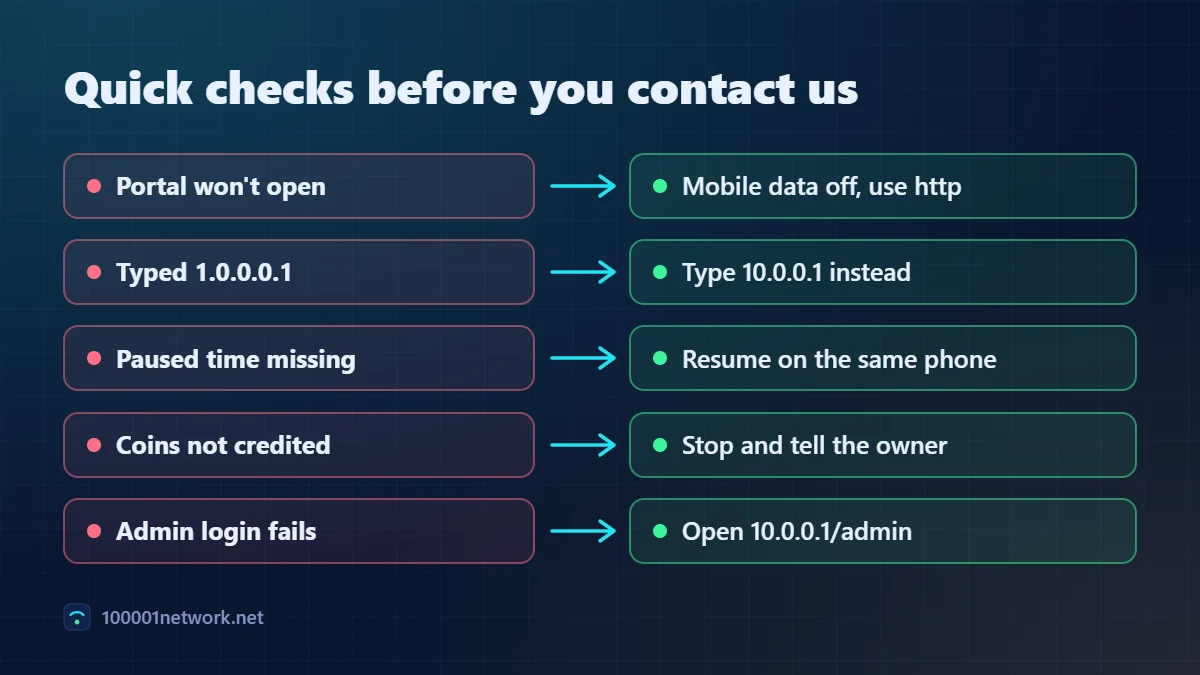
Many Piso WiFi questions come down to the same five problems. Each one has a fix you can try right now while standing near the vendo. If one of these works, you will be back online long before a reply could reach you.
The Portal at 10.0.0.1 Will Not Open
- Join the vendo’s Wi-Fi, the network name printed on the machine, not your home Wi-Fi or a neighbour’s.
- Turn off mobile data and any VPN. On Android, set Private DNS to Off or Automatic for now.
- Type
http://10.0.0.1in the address bar, not in the Google search box. - If nothing loads, open a plain http site such as neverssl.com. Many vendos redirect it to the sign-in page.
- Forget the network and join it again, or switch airplane mode on and off.
The sign-in page is a captive portal, so it only exists inside the vendo’s own network. If it still won’t load, the machine may be restarting or offline. Our customer portal guide has separate Android and iPhone steps with more detail.
You Typed 1.0.0.0.1 or 10.0.0.0.1
A real address has exactly four numbers separated by three dots. Strings like 1.0.0.0.1, 10.0.0.0.1 or “10.0 0.1” have five numbers or a space, so your browser treats them as a search and shows Google results. Type 10.0.0.1 instead. Owners need 10.0.0.1/admin, not 1.0.0.0.1/admin. Our 1.0.0.0.1 login guide lists every common typo and what to type in its place.
Your Paused Time Is Missing
Paused minutes usually vanish for a handful of reasons. The pause may have expired, the owner may limit how many times you can pause, you may have resumed on a different phone, or your phone may have shown the vendo a new random Wi-Fi address. On some systems a reboot or brownout also clears sessions.
- Resume on the same phone that paused, while joined to the same vendo network.
- To stop it happening again, turn off Private Wi-Fi Address on iPhone or Randomized MAC on Android for the vendo network.
- Ask the owner how long paused time lasts and how many pauses are allowed.
The Piso WiFi pause time guide explains each cause and shows where the phone settings are. We cannot restore lost minutes, because they are stored on the owner’s machine, not on our site.
Coins Were Not Credited
- Stop inserting coins. More coins will not unjam a stuck slot, and you could lose those too.
- Wait about a minute, then refresh
http://10.0.0.1on the same phone. - Check that you tapped Insert Coin before dropping the coin, and Done Paying or Confirm after it.
- Write down the time, the amount and the device info shown on the portal.
- Contact the vendo owner. A phone number or sign is often posted on the machine.
Many vendo systems keep a sales log, so the owner can usually check what happened and add the missing time. We have no access to any vendo, so this is one problem we truly cannot fix from here.
The Admin Password Does Not Work (Owners)
Owners log in at 10.0.0.1/admin, not on the customer page. The most widely reported default for LPB Piso WiFi is admin / 123456789, while Wifi5 Soft reportedly uses an owner account instead of a fixed default. Defaults vary by version, and an installer may have changed yours, so contact your seller or installer first.
If nobody knows the password, a factory reset is the last resort, and it erases your rates, vouchers and Wi-Fi settings. The 10.0.0.1 admin login guide explains the reported defaults and how a reset works. We cannot recover passwords for machines you do not own or manage.
Who to Contact for What
Piso WiFi involves three different parties: the person who owns the vendo, the internet provider that feeds it, and help sites like ours. Sending your problem to the right one can save you days of waiting.
| Problem | Who to contact | Why |
|---|---|---|
| Coins dropped, no time added | Contact the vendo owner | Only they can see sales and add time |
| Paused time disappeared | Contact the vendo owner | They set pause limits and expiry |
| Rates or voucher question | Contact the vendo owner | Prices are set per machine |
| Whole vendo has no internet | Contact the vendo owner | Their line or machine is down |
| Owner: modem shows no internet | Contact your ISP | The fault is before the vendo |
| Owner: slow speed at the modem | Contact your ISP | Test on the modem first |
| Owner: licence not activating | Contact the seller or vendor | They issue the licences |
| Owner: forgot admin password | Installer, then our guide | They may have changed the default |
| Portal won’t open on your phone | Quick fixes, then contact us | Usually a phone setting |
| Error or old step in a guide | Contact us | We fix and update our guides |
| Topic we have not covered | Contact us | Requests shape new guides |
If you are a customer and don’t know who owns the vendo, look for a sticker or sign on the box, or ask at the store or house where it is installed. Owners usually want to hear about problems, since an unhappy customer rarely comes back.
Troubleshooting Flow: Fix It, Ask the Owner or Contact Us
Still not sure where your problem belongs? Start at step 1 and stop at the first answer that fits. The flow sends money and time problems to the owner, line problems to the internet provider, and guide questions to us.
| Step | Check | If yes | If no |
|---|---|---|---|
| 1 | On the vendo Wi-Fi with mobile data off? | Go to step 2 | Join the vendo network first |
| 2 | Does 10.0.0.1 open in the address bar? | Go to step 3 | Try the portal fixes above |
| 3 | Is it about coins, time or pause? | Contact the vendo owner | Go to step 4 |
| 4 | Is the vendo offline for everyone nearby? | Owner checks the modem, then the ISP | Go to step 5 |
| 5 | Is it an admin panel or licence problem? | Seller or installer first | Go to step 6 |
| 6 | Did our guides answer your question? | Follow the matching guide | Contact us with the form |
What to Include in Your Message
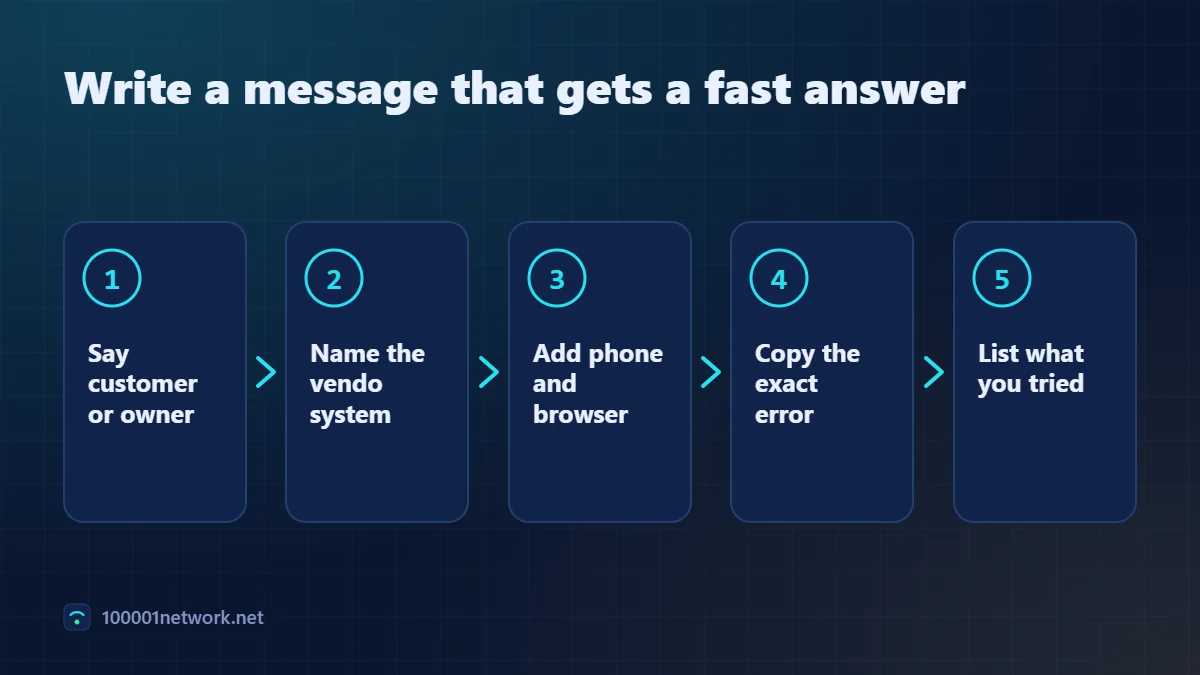
The contact form asks for your name, an email address so we can reply, and your message. A clear message lets us answer in one reply instead of three. Try to include these details:
- Whether you are a customer or the vendo owner.
- The vendo system if you know it, such as LPB, AdoPiSoft or Wifi5 Soft. The name often shows on the portal or the box.
- Your device and browser, for example an Android phone with Chrome or an iPhone with Safari.
- The exact address you typed and the exact error or message you saw.
- What you already tried, including any fixes from this page.
- The link to the guide, if you are reporting a mistake.
Copy any error text word for word. Small details, such as http versus https or a missing dot, often point straight to the answer. One problem per message also helps, because mixed questions are easy to half-answer.
Never send passwords or money details. Do not include your admin password, Wi-Fi password, GCash or Maya MPIN, one-time PIN or bank details. We will never ask for them. If someone contacts you claiming to be from 100001 Network and asks for any of these, it is a scam.
Response Times and What We Can and Cannot Do
We read every message and usually reply within two working days. Messages sent over a weekend, a holiday or a busy week may take a little longer. If you have not heard back after a few days, check your spam or promotions folder before you contact us again.
| Message type | What we do | What helps us |
|---|---|---|
| Question about a guide | Answer it or point you to the right section | The page and what you tried |
| Correction or outdated step | Check sources, then fix the page | Link, the error and your source |
| New topic request | Consider it for a future guide | The problem in your own words |
| Owner or installer update | Compare with other reports first | Software name and version |
| Free time or hack request | No reply | Nothing, we don’t help with this |
What We Can Do
- Explain how the portal, pause time and admin login usually work.
- Point you to the guide that matches your problem.
- Fix mistakes and outdated steps in our pages.
- Write new guides based on the questions readers send.
What We Cannot Do
- Add time, restore paused minutes or refund coins. That data lives on the owner’s machine.
- Reset, unlock or log in to someone else’s vendo.
- Recover admin passwords for machines you do not own or manage.
- Fix your internet line, issue software licences or speak for any vendo brand.
- Visit or repair a machine in person.
These limits protect everyone. Getting into a machine that is not yours can count as illegal access under the Cybercrime Prevention Act of 2012. That is why we only explain general steps and send ownership questions back to the real owner or seller.
Corrections and Content Suggestions
Vendo software changes often, and owners can rename buttons or change limits. If a step, menu name or default password in one of our guides doesn’t match what you see, contact us. Include the page link, what the guide says, what your screen shows, and your software version if you know it.
We check each report against official sources and other reports before we change a page, so one message may not change a guide right away. Where sources disagree, we say so on the page instead of picking a side. You can read more about our process on the About 100001 Network page.
- A vendo system or portal screen we have not covered yet.
- An error message you could not find in any guide.
- A step that confused you, even if it was technically right.
- A question you think belongs in one of our FAQ sections.
Vendo Owners and Installers: Contacting Us
Owners and installers see problems that customers never do, from licence messages to coin slot quirks. If you run vendos, your notes help us keep our guides accurate for everyone. These are the most useful things to send:
- Menu names or paths that changed in a new software version.
- Default logins that differ from what our guides report.
- Customer problems you see often that we have not covered.
- Links to official documentation from your software vendor.
We are not affiliated with LPB, AdoPiSoft, Wifi5 Soft or any internet provider, and we do not sell machines or licences. For licence keys, warranty claims or hardware faults, contact your seller or the vendor directly. New owners may find our Piso WiFi vendo business guide useful before they buy.
If you sell vendos or software and want us to look at your product, you can say so in the form. We can’t promise coverage, and ads on the site never change what our guides say, as our disclaimer explains.
Privacy of Your Message
We use what you send through the contact form only to reply to you and to improve our guides. We do not sell it or post it publicly. It may pass through the services that run the site, such as hosting and email, as our privacy policy explains.
We keep messages only as long as we need them to answer you and handle follow-ups. You can ask to see, correct or delete what you sent by using the same form. These rights come from the Philippine Data Privacy Act of 2012, and the National Privacy Commission explains them in more detail.
Mabilis na gabay sa Tagalog:
- Subukan muna ang quick fixes sa itaas bago mag-message.
- Kung hindi pumasok ang hulog o nawala ang oras mo, i-contact ang may-ari ng vendo.
- Hindi kami makakapagdagdag ng oras o makakapag-reset ng vendo ng iba.
- Sa message, isulat kung customer ka o owner, anong vendo, at anong error ang lumabas.
- Huwag ipadala ang password, MPIN o OTP mo.
FAQs about How to Contact Us
How do I contact 100001 Network?
Use the form near the top of this page. It is our only channel. Add your name, an email address for our reply, and a clear description of the problem. We usually answer within two working days, sometimes a little longer after weekends or holidays.
Do you have a phone number, email address or Facebook page?
No. We do not publish a phone number, email address or social media account, and we do not offer chat support. The contact form is the only way to reach us. If someone contacts you on social media saying they are from 100001 Network, treat it as a likely scam.
Can you add time or refund coins I lost in a vendo?
No. Your time and payments are stored on the owner’s machine, and we have no access to any vendo. Contact the owner, give them the time, amount and device info, and they can usually check the sales log and fix it.
Can you reset my vendo or recover its admin password?
We can explain how resets and default logins usually work, but we cannot log in to or unlock any machine. If you own it, ask your installer or seller first. We never help recover passwords for vendos that belong to someone else.
How long does it take to get a reply after I contact you?
We usually reply within two working days. Corrections can take longer to appear on the page, because we check them against other sources first. If you hear nothing after a few days, look in your spam or promotions folder.
Are you part of LPB, AdoPiSoft or Wifi5 Soft?
No. We are an independent help site with no ties to any vendo brand, software vendor or internet provider. For licences, warranties or hardware faults, go to the company or seller you bought from. We are still happy to explain general steps.
Is it safe to send my details through the contact form?
The form only needs your name, an email address and your message. Never include passwords, PINs or bank details, and we will never ask for them. Our privacy policy explains how long we keep messages and how to ask for deletion.
Final Word
Many Piso WiFi problems are fixed at the vendo itself: check the address, the network and the same-phone rule, and ask the owner about coins and time. For guide questions, corrections or ideas, contact us with the form at the top of this page. Our Piso WiFi guides hub is the best place to start reading.