Quick answer: A piso wifi vendo is a coin-operated Wi-Fi hotspot. A customer connects, taps Insert Coin and drops ₱1 or more, and a small computer board inside turns the coins into minutes of internet. When the time runs out, access stops. To start one, you need a board running vendo software, a coin slot, an access point, a power supply, a locked enclosure and a steady internet plan.
A piso wifi vendo is the coin-slot Wi-Fi box you see on the walls of sari-sari stores, boarding houses and terminals. This guide explains how the machine works, which parts and software you need, and nine steps to start your own, with honest notes on costs, permits and earnings.
Just want to get online? Skip to the customer section below, or read our 1.0.0.0.1 login guide for help with the portal address.
What Is a Piso WiFi Vendo?
A piso wifi vendo is a self-service hotspot that sells internet time in small amounts, starting at one peso. It is a cousin of the Pisonet, the coin-operated computer rental found in many Filipino neighbourhoods. Instead of renting a computer, customers use their own phone and pay only for the minutes they need.
You will also hear it called a wifi vendo, a vendo WiFi or a Piso WiFi machine. For customers, it is a cheap way to get online without load. For owners, it is a small business that needs little daily attention once set up well.
How to Start a Piso WiFi Vendo in 9 Steps
Here is the whole process at a glance; each step is covered in detail below.
- Scout the location: steady foot traffic, a safe spot and reliable power.
- Arrange internet: fibre if available, or a prepaid LTE or 5G modem.
- Pick your software: compare LPB, AdoPiSoft, Wifi5 Soft and others, and their supported boards.
- Buy parts or a ready-made wifi vendo kit: board, coin slot, power supply, relay board, access point and enclosure.
- Install the software: flash it to a microSD card or supported device, then activate the licence.
- Wire and test the coin slot: follow the wiring guide and test every coin type.
- Set rates and the Wi-Fi name: add coin rates and change the default admin password.
- Do the paperwork: register the business and confirm any telecom rules.
- Launch and maintain: post a rate sign, watch the sales log and keep the unit cool.
How the Piso WiFi Vendo Machine Works
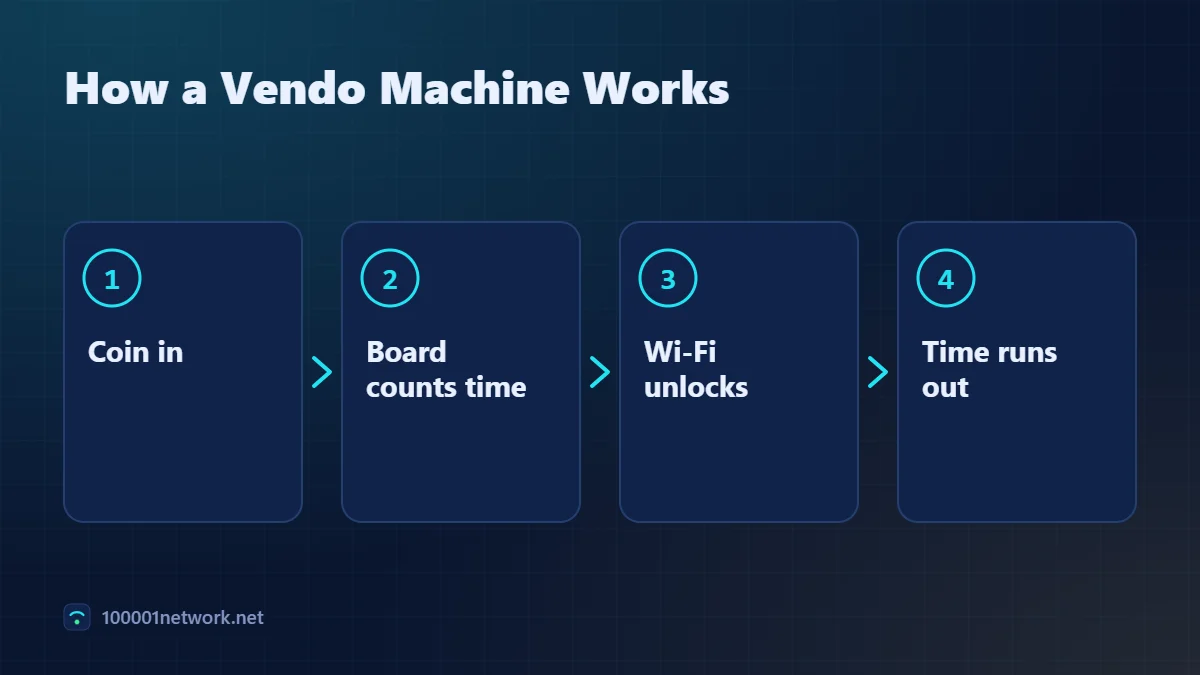
Every piso wifi vendo machine follows the same simple chain: money goes in at one end and internet access comes out the other. Brand names differ, but the parts always do the same jobs.
- Coin acceptor: checks each coin and sends a pulse signal to the board. You choose which coins it accepts.
- Controller board: a small computer such as a Raspberry Pi or Orange Pi, or a supported router, runs the vendo software. It counts coins, adds time and keeps the sales record.
- Access point: a Wi-Fi router or access point broadcasts the open network that customers join.
- Internet connection: a fibre or LTE modem links everything to the wider internet.
When a phone joins the network, the software blocks normal traffic and shows a login page instead. This page is called a captive portal, and on the most common systems it opens at 10.0.0.1. The software usually tells phones apart by their MAC address, a hardware ID for the Wi-Fi chip, so it knows whose time to count.
After the coins are counted, that phone gets through until its paid minutes run out. Then access is blocked again and the portal asks for more coins.
Parts List: What Goes Inside a Wifi Vendo
You can buy a pre-built unit or assemble one yourself. A typical build includes the items below, but always check your software’s supported hardware list first.
| Part | What it does | What to check |
|---|---|---|
| Controller board (SBC or router) | Runs the vendo software | On the software’s supported list |
| microSD card | Holds the software and settings | Reliable brand; 16 GB or 32 GB is common |
| Coin slot (coin acceptor) | Reads coins and sends pulses | Multi-coin model you can program |
| Power supply | Powers the coin slot and board | Stable output with some headroom |
| Relay or interface board | Links the coin slot to the board | Matches your software’s wiring guide |
| Access point or router | Broadcasts the customer Wi-Fi | Range, outdoor rating, AP mode |
| Enclosure | Protects and locks the parts | Lockable, ventilated, weather-resistant |
| Internet plan | Supplies the actual internet | Coverage and reliability at your spot |
A note on DIY: wiring a coin slot means working with a power supply. If electronics are new to you, a pre-assembled piso wifi vendo or a local technician is safer.
Vendo Software Options
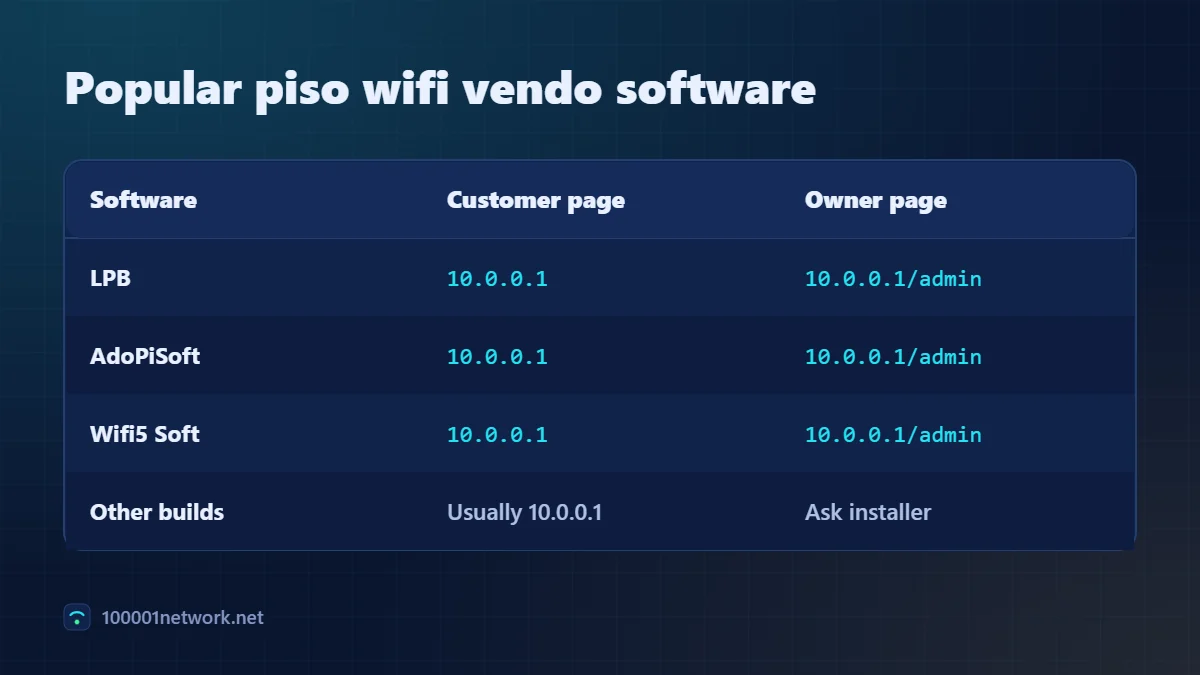
The software is the brain of the machine. It runs the customer portal, counts coins, stores your rates and gives you an admin panel, usually at 10.0.0.1/admin. These are the names that come up most often in the Philippines.
| Software | Runs on (as listed or reported) | Good to know |
|---|---|---|
| LPB Piso WiFi | Raspberry Pi, Orange Pi, some routers, PC, TV box | Cloud features, coin and e-wallet payments, yearly licence |
| AdoPiSoft | Raspberry Pi, Orange Pi, Newifi 3 D-2, PC or VM | Formerly Ado Piso WiFi; check its site for current plans |
| Wifi5 Soft | Check with your seller | Third-party guides describe an account-based admin login |
| 1Click Piso WiFi | Ask the seller | Another name people search for; verify seller and support |
LPB’s official site lists cloud-synced time, pause and resume, coin plus GCash and Maya payments, vouchers and per-user speed limits. Our LPB Piso WiFi guide covers setup and admin login.
AdoPiSoft is made by Flarego Technologies Corp. in Cebu; its official site lists supported boards and plans. We could not verify an official Wifi5 Soft website, so see our Wifi5 Soft guide and confirm details with your seller.
What About 1Click Piso WiFi?
1Click Piso WiFi is another name many people search for when shopping for a wifi vendo. We could not find reliable official information about its features, so we will not guess. If a seller offers one, ask who makes the software, how licences and updates work, and who to contact when it breaks. Get those answers in writing before you pay.
LPB Licence Prices
LPB is one of the few options that publishes licence prices in pesos. These one-year plans are as listed on lpbpisowifi.com (Oct 2026), which also says Premium is lifetime on version 15.3 and below. Prices and promos change, so confirm on the official site before paying.
| Plan | Listed price | Promo price | Users |
|---|---|---|---|
| Lite | ₱400 per year | ₱250 | Up to 50, one sub-account |
| Premium | ₱700 per year | ₱500 | Unlimited |
Start-Up Cost Checklist
We do not list hardware prices because they change often and vary by seller. Use this checklist to budget for every part of your wifi vendo, then compare current listings from several shops before you buy.
| Cost item | Type | Notes |
|---|---|---|
| Board and microSD card | One-time | Must be supported by your software |
| Coin slot | One-time | Programmable multi-coin type |
| Power supply and wiring | One-time | Avoid the cheapest supply |
| Access point or router | One-time | Outdoor model if mounted outside |
| Enclosure and lock | One-time | Include mounting hardware |
| Software licence | Often yearly | Check the renewal price too |
| Internet plan | Monthly | Ask about lock-in periods |
| Electricity | Monthly | The unit runs day and night |
| Repairs and spares | Ongoing | Keep a spare SD card ready |
Ask sellers exactly what a package includes. A cheap deal without the access point, licence or enclosure can cost more in the end.
Choosing an Internet Plan
Many users share one connection, so speed and stability matter even more than at home. Here are the general trade-offs; we skip ISP prices because plans change often.
| Factor | Fibre | Prepaid LTE or 5G |
|---|---|---|
| Stability | Usually steady | Varies with signal and tower load |
| Data limits | Typically no data cap | Many plans have caps or fair-use limits |
| Setup | Needs coverage and installation | Plug in and start quickly |
| Contract | Often has a lock-in period | Usually no contract |
| Best for | Busy, long-term spots | Testing a spot or areas without fibre |
Whatever you choose, ask the ISP whether commercial sharing is allowed; some owners move to a business plan for this reason. Keep the modem near your vendo WiFi box for easy restarts.
Choosing a Location
Location is the biggest single factor in how often coins drop into a piso wifi vendo. Look for places where people wait, stay or live without their own home internet.
- Near boarding houses, dormitories and apartments with many tenants
- Sari-sari stores, carinderias and laundry shops where people wait
- Terminals, waiting sheds and markets with steady foot traffic
- Neighbourhoods where few homes have a fibre line
- A wall or post where the box is visible, sheltered from rain and hard to tamper with
Before you commit, walk the area at different times of day and count nearby vendos. Get the property owner’s agreement in writing, especially if you share their electricity.
Setting Your Rates
You set the rates yourself in the admin panel. There is no fixed standard, and owners adjust prices to match competition and internet costs. The table shows example rates only, not a recommendation.
| Coin | Example time (owner-set) | Note |
|---|---|---|
| ₱1 | 5 to 15 minutes | Varies a lot by area |
| ₱5 | About 30 minutes | Common starter rate |
| ₱10 | About 1 hour | Popular with students |
| ₱20 | 2 to 3 hours | Bigger coins often get bonus time |
Many owners give bonus time for bigger coins, and some systems can sell time by data. Post your rates on the box in large text so customers know what they are paying for.
How Customers Use a Piso WiFi Vendo
For customers, getting online takes under a minute. Button labels differ, but the flow is nearly always the same.
- Connect your phone to the vendo’s Wi-Fi network. It usually has no password.
- Wait for the login page to pop up, or open your browser and type
10.0.0.1. - Tap Insert Coin (or Insert Money) before dropping anything in.
- Drop your coins within the countdown, then tap Done Paying or the confirm button.
- Check that your remaining time appears, then start browsing.
Turn off mobile data if the page will not load, since your phone may skip the vendo network. Our 10.0.0.1 Piso WiFi portal guide explains every button on the customer screen.
Pause Time and Vouchers
Many systems let customers pause their remaining time and resume later on the same phone. The owner decides whether pause is allowed and how long paused time lasts. If time vanishes after a reconnect, a randomised MAC address on the phone is a common cause. See the Piso WiFi pause time guide for steps and fixes.
Owners can also create vouchers, codes customers type into the portal instead of using coins. They help sell longer packages and keep a piso wifi vendo earning while the coin slot is being fixed.
Maintenance and Security
A vendo runs all day, often outdoors, so regular care prevents most breakdowns.
- Clean the coin slot and check for jams or fake coins every week
- Keep the enclosure ventilated and out of direct afternoon sun
- Schedule restarts of the modem and vendo if your software supports it
- Back up your settings and keep a spare microSD card ready
- Compare the sales log with the coins you collect
- Install updates from the official source only
Change the default admin password first. Many vendo systems ship with a default login that is widely published online. Anyone on your Wi-Fi could try it and change your rates or network name. Set a long, unique password the day you install the unit. Our 10.0.0.1 admin login guide shows how.
Keep the box locked and firmly mounted, and empty the coins often so little cash sits inside overnight.
Permits and Registration
A wifi vendo is a business, so treat it like one. Requirements depend on your city or municipality, but the usual steps for a small Philippine business look like this.
- Register a business name with the DTI if you are a sole proprietor
- Get a barangay clearance for the business location
- Apply for a mayor’s permit or business permit at your city or municipal hall
- Register with the BIR for tax purposes and issue receipts as required
Because a vendo shares internet access with the public, telecom rules may also apply. Confirm current requirements with the National Telecommunications Commission (NTC) and your local permit office before you launch. This is general information, not legal advice.
What Affects Your Earnings
Nobody can honestly promise a fixed income from a piso wifi vendo. Two units in the same town can perform very differently. Use these factors to judge your own spot.
| Factor | Why it matters |
|---|---|
| Foot traffic | More people nearby means more coin drops |
| Competition | Nearby vendos split the same customers |
| Internet speed and uptime | Slow or offline Wi-Fi sends customers away |
| Your rates | Too high loses customers; too low may not cover costs |
| Running costs | Internet, power and licence fees come out of every peso |
| Mobile data promos | Cheap data deals compete with your service |
Track your sales log for a few weeks before adding a second unit. Your own numbers beat any online estimate.
Common Mistakes New Owners Make
- Buying hardware the software does not support
- Keeping the default admin password
- Choosing a spot because it is free, not because people pass by
- Using a weak power supply that causes restarts
- Running many users on a slow plan with no speed limits
- Skipping permits
- Buying from a seller with no after-sales support
Common Problems and Fixes
Most issues come from the coin slot, the internet line or the customer’s phone. Try the simple checks first.
| Symptom | Likely cause | Fix |
|---|---|---|
| Coins not counted | Dirty slot, coin not set, loose wire | Clean it, recheck settings and wiring |
| Coin dropped, no time added | Coin went in before tapping Insert Coin | Tap Insert Coin first |
| Login page does not appear | Mobile data, VPN or private DNS is on | Turn them off, open 10.0.0.1 |
| Time gone after reconnect | Randomised MAC address on the phone | Turn off private address for this network |
| Connected but no internet | ISP outage or modem problem | Check modem lights, then restart it |
| Very slow at peak hours | Too many users, no speed limits | Set per-user limits or upgrade |
| Vendo freezes or restarts | Weak power supply, heat, worn SD card | Better supply, airflow, new card |
| Licence error | Expired licence or offline at activation | Check status, contact software support |
If the portal address itself is the problem, our 10.0.0.1 login help page covers typos like 1.0.0.0.1 and other address mix-ups.
Mabilis na gabay (Taglish):
- Ang piso wifi vendo ay Wi-Fi na de-hulog: maghulog ng piso, may internet ka na.
- Kumonekta sa Wi-Fi ng vendo, buksan ang
10.0.0.1, pindutin ang Insert Coin, saka maghulog. - Huwag munang maghulog bago pindutin ang Insert Coin, baka hindi ma-credit.
- Para sa may-ari: palitan agad ang default admin password at kumuha ng permit sa munisipyo.
FAQs about the Piso WiFi Vendo
How much does it cost to start a piso wifi vendo?
There is no single price. Your total depends on the board, coin slot, access point, enclosure, software licence and internet plan. Hardware prices change often, so compare current listings from several sellers. LPB lists its one-year licence prices on its official site.
Is a wifi vendo business profitable?
It can be, but income is never guaranteed. Profit depends on foot traffic, competition, your rates, internet reliability and running costs. Test a location, track your sales log for a few weeks and expand only when your own numbers make sense.
Can I build a piso wifi vendo machine myself?
Yes. Many owners assemble one from a Raspberry Pi or Orange Pi, a coin slot, a power supply, a relay board and an access point, following their software’s wiring guide. If electronics are new to you, buy a pre-assembled unit or hire a technician.
What is 1Click Piso WiFi?
1Click Piso WiFi is another name people search for when shopping for vendo machines or software. We could not confirm its features from an official source. Before buying, ask the seller who makes the software, how licences and updates work, and how to reach support.
Do I need a permit for a vendo WiFi business?
In general, yes. Typical local steps are DTI business name registration, a barangay clearance, a mayor’s or business permit and BIR registration. Also confirm current telecom requirements with the NTC, and ask your local permit office, since rules differ by location.
What internet plan is best for a piso wifi vendo?
Fibre is usually better for busy spots because it tends to be stable and often has no data cap. Prepaid LTE or 5G suits a trial location or an area without fibre. Either way, ask the ISP whether commercial sharing is allowed.
Why can’t customers open the vendo portal?
Usually mobile data is still on, a VPN or private DNS is active, or the phone joined the wrong network. Ask customers to switch these off, reconnect and type 10.0.0.1 in the address bar. If nobody can connect, restart the vendo and check the modem.
Final Word
A piso wifi vendo is simple at heart: coins in, minutes out. Success comes from the unglamorous parts done well, such as a good location, a stable internet line, fair rates, a changed admin password and proper permits. Start small, track your numbers and grow from there.