Quick answer: LPB Piso WiFi is coin-operated Wi-Fi vendo software used across the Philippines. Customers join the vendo Wi-Fi and open 10.0.0.1 to insert coins, pause and resume. Owners log in at 10.0.0.1/admin, where the commonly reported default is admin / 123456789, so change it right away. A yearly licence is ₱400 (Lite) or ₱700 (Premium), as listed on the official site in October 2026.
LPB Piso WiFi is a popular system inside the coin-operated Wi-Fi boxes you see in sari-sari stores, boarding houses and terminals. This guide covers both sides: how owners set it up and run it, and how customers pay, pause and resume. We are an independent help site and are not affiliated with LPB.
What Is LPB Piso WiFi?
LPB Piso WiFi is vendo software. You install it on a small computer such as an Orange Pi or Raspberry Pi, connect a coin slot and an access point, and it turns your internet line into paid Wi-Fi. When a customer drops a coin, the software gives that phone a set amount of time or data. When the balance runs out, it cuts the connection. It works like the captive portal you see in hotels, except people pay per peso.
According to the official LPB website, the current platform (promoted as LPB Piso WiFi 2.0) includes these features:
- LPB Cloud session time, which syncs customer time through the cloud
- Pause and resume for customers
- Coins plus e-payments through GCash and Maya
- Buy time or buy data plans
- Bandwidth and traffic control, including speed limits
- A voucher system, e-load and cash-in
- Multi sub-vendo with auto select
- PPPoE server, remote monitoring, sales tracking and machine transfer
- Custom portal themes, plus Piso Net and phone rental modules
People often type the name wrong. Searches like “lbs piso wifi” or “lbp piso wifi” almost always mean the same LPB system. You will also see different version numbers. Older guides talk about LPB OS v15.x images, while the official site now promotes the cloud-based 2.0 platform. Menus and features can differ between versions, so check which build your vendo runs before you follow any steps.
LPB Piso WiFi Supported Hardware
LPB Piso WiFi runs on more kinds of devices than most vendo systems. The table below groups the hardware listed on the official site as of October 2026. Always download the image made for your exact model, because an image for one board will not boot on another.
| Type | Models listed | Notes |
|---|---|---|
| Raspberry Pi | Pi 3, Pi 4, Pi 5 | Common DIY choice, easy to find |
| Orange Pi | One, PC, Zero 3, Orange Pi 5 | Budget DIY; often paired with a USB LAN adapter |
| Router builds | Newifi D2, Newifi 3 D-2, Ruijie EW1200G PRO, Linksys EA8300 | LPB is flashed onto the router itself |
| PC | PC version (desktop or mini PC) | Uses more power; suits bigger setups |
| TV box | MXQ Android box | Low-cost option |
The best pick depends on your budget and how many users you expect. A Raspberry Pi or Orange Pi build is the usual DIY route, and a failed board is cheap to replace. Router builds can put the vendo and Wi-Fi in one box, but the flashing steps need more care. If you are still deciding whether the business makes sense, our Piso WiFi vendo business guide covers costs and placement.
What You Need Before You Start
Here is a typical parts list for a single-board build. Kits from local sellers usually bundle most of it.
- A supported board, for example an Orange Pi One or Raspberry Pi 4
- A microSD card of at least 16 GB
- The LPB image for your board, downloaded from the official site
- A programmable multi-coin slot
- A 12V power supply (5A is common), a buck converter to step the voltage down for the board, and a relay module
- A USB-to-LAN adapter if your board has only one Ethernet port
- An access point or router to broadcast the vendo Wi-Fi, plus LAN cables
- An internet line, such as fiber or a prepaid modem
- A vendo cabinet, and a laptop to flash the image with a tool such as balenaEtcher
LPB Setup Overview for Owners
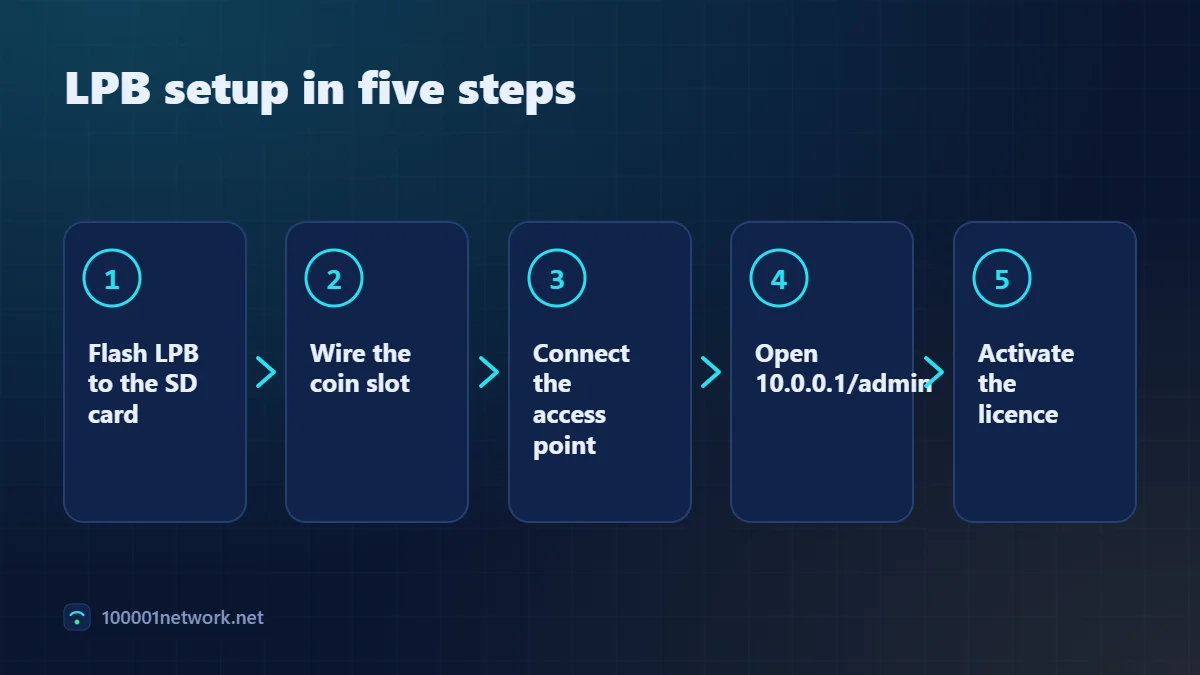
Every build is a little different, so treat this as an overview. Follow the instructions and wiring diagram that come with your image or kit.
- Flash the image. Write the LPB image to the microSD card with balenaEtcher or a similar tool. Router builds use their own flashing method.
- Wire the coin slot. Connect the coin signal wire, the relay and the power lines to the board as your diagram shows. Program the coin slot for the coins you accept.
- Power it up. Insert the card, connect the 12V supply through the buck converter, and check that the board boots.
- Connect the network. Plug the internet line from your modem into the port your guide marks as WAN, and connect the access point on the LAN side.
- Activate the licence. Join the vendo Wi-Fi, open
10.0.0.1/admin, change the password, then enter your licence key in the License menu. - Set rates and test. Add your coin rates, drop a test coin, and confirm the time shows up on a phone.
A note on wiring: one published Orange Pi One/PC build guide connects the coin signal to GPIO pin 3 and the relay to pin 5. Treat that as an example only. Pin layouts can change by board and LPB version, and a wrong connection can damage the board or the coin slot. Use the diagram for your exact image, and unplug the power before you touch any wire.
LPB Piso WiFi 10.0.0.1 Admin Login for Owners
The owner panel lives at 10.0.0.1/admin. Plain 10.0.0.1 opens the customer portal instead, which confuses many new owners. You must be connected to the vendo network, by Wi-Fi or cable, for either page to load. For admin pages and passwords on other systems, see our 10.0.0.1 admin login guide.
- Connect your phone or laptop to the vendo Wi-Fi, or plug into its LAN.
- Turn off mobile data and any VPN so the browser stays on the local network.
- Type
http://10.0.0.1/adminin the address bar, not the search bar. - Enter the username and password, then tap Login.
- Open the account or password settings and set a new, strong password.
The LPB Piso WiFi 10.0.0.1 admin login is commonly reported to use admin as the username and 123456789 as the password. LPB does not publish this on its website, and a seller or previous owner may have changed it. If it fails, ask whoever set up the unit before you try anything drastic like reflashing.
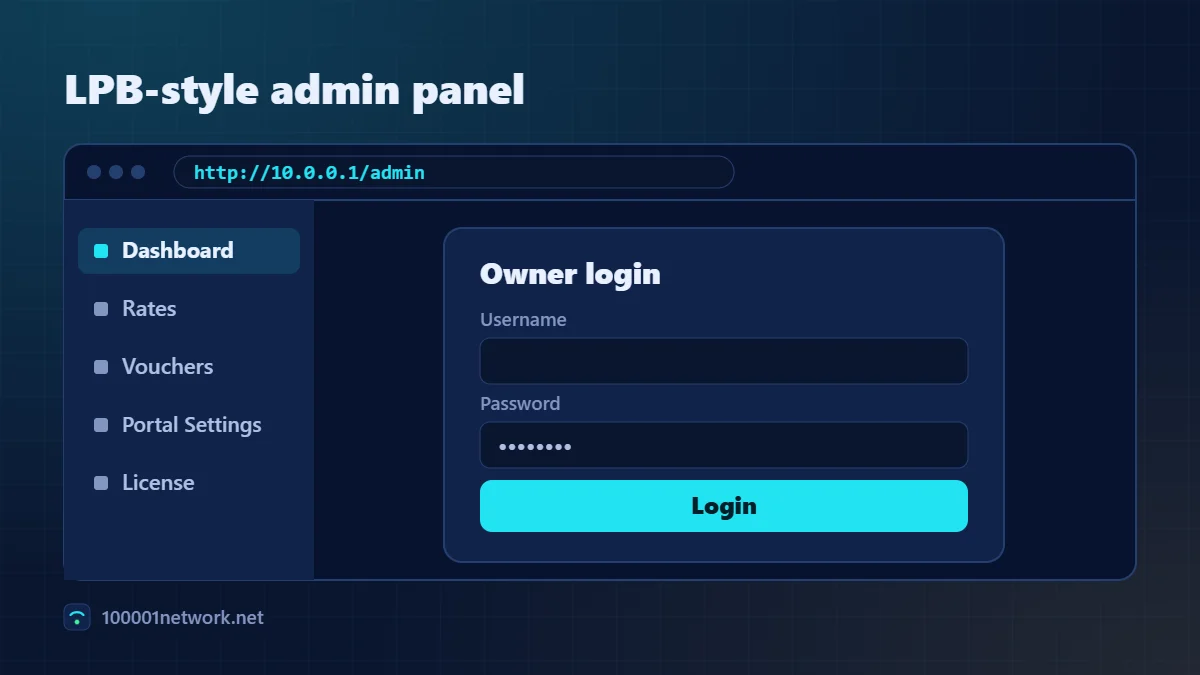
What to change after your first login
- The admin password: make it long, and never your birthday or phone number
- The vendo Wi-Fi name (SSID), so customers can find you
- Your rates, pause rules and speed limits
- The portal theme, store name and contact number
- Remote monitoring, if you use the LPB cloud
Security warning: The LPB default password is posted all over the internet, and anyone on your Wi-Fi can try it.
- Change the default password on day one.
- Never log in to the admin panel of a vendo you do not own or manage.
- Keep your licence key and cloud account details private.
- Write your new password down and store it safely. A reset or reflash can wipe your rates and settings.
Rates, Vouchers, Speed Limiter and Sub-Vendos
Most day-to-day work happens in a few menus. The names shift between versions, but you will usually find these sections in the sidebar after you log in.
- Rates: set how much time or data each coin buys. Example rates set by an owner might be ₱1 for 5 minutes, ₱5 for 30 minutes and ₱10 for 1 hour. You choose your own.
- Vouchers: create codes that customers type on the portal instead of inserting coins. Handy for resellers and regulars.
- Speed limiter: many builds offer a global limit and a default per-user limit for upload and download, so one user cannot hog the line.
- Sub-vendo: add extra coin boxes around the area that share the main unit. The official site lists multi sub-vendo with auto select.
- E-payments and e-load: accept GCash or Maya and sell load, if your version supports it.
- Sales: check daily earnings and coin counts so you can spot problems early.
How to Enable LPB Piso WiFi Pause Time
Pause lets a customer freeze unused time and come back later. On LPB, the owner decides whether pause is allowed and how it behaves. The exact menu path changes by build, but on many versions it is reported to sit under Portal Settings, near the insert-coin options.
- Log in at
10.0.0.1/admin. - Open Portal Settings, or the section your build uses for the customer portal.
- Find the pause or pause/resume time option and switch it on.
- Set any limits your version offers, such as how long a session can stay paused.
- Save, then test it on a phone by pausing and resuming a short session.
Sources do not agree on the default pause limits, and they likely differ by version. Pick a limit that is fair. A very short limit frustrates people who already paid, while no limit at all can leave old paused sessions sitting in the system. If customers say there is no pause button, check this setting first.
How Customers Use an LPB Vendo
If you are a customer, you never need the admin page. Everything happens on the LPB Piso WiFi 10.0.0.1 portal. For a full tour of the portal screen and its buttons, read our 10.0.0.1 Piso WiFi customer guide.
Insert money and start your time
- Connect to the vendo Wi-Fi name shown on the machine.
- Wait for the sign-in page to pop up, or open
10.0.0.1in your browser. - Tap Insert Money. Some themes say Insert Coin.
- Drop your coins before the countdown ends.
- Tap Done Paying. Your time or data starts right away.
Pause and resume your time
Using LPB Piso WiFi pause time is simple once your time is running. Open 10.0.0.1 again and tap Pause. When you want to go back online, open the portal on the same phone and tap Resume. Our guide to Piso WiFi pause time explains limits and lost time in more detail.
Always use the same device. The vendo usually tracks your session by your phone’s MAC address, so a different phone will not see your paused time. Newer phones can use a random Wi-Fi address, which can make paused time seem to vanish. If that happens, turn off Private Wi-Fi Address on iPhone or set the vendo network to use the phone MAC on Android.
What is lpb.wifi?
Many people search for lpb.wifi when they want the portal. It is not LPB’s website, since the official site is lpbpisowifi.com. On some setups a local name may point to the portal, but that depends on how the vendo is configured. If lpb.wifi does not open, the 10.0.0.1 LPB Piso WiFi portal address is the dependable choice. Still stuck? Our 10.0.0.1 login help page covers common address mistakes.
LPB Licence: Lite vs Premium
Every LPB Piso WiFi vendo needs a licence to run with full features. The prices below are as listed on the official LPB site in October 2026. Promo prices come and go, so confirm on the site before you pay.
| Plan | Price (1 year) | Users | Sub-accounts | Version note |
|---|---|---|---|---|
| Lite | ₱400 (promo ₱250) | 50, excluding offline users | 1 | Not allowed on v15.3 and below |
| Premium | ₱700 (promo ₱500) | Unlimited | Unlimited, plus unlimited PPPoE | Still lifetime on v15.3 and below |
The site says all licences have 1-year validity, but it also says Premium is still lifetime on v15.3 and below. In plain terms, older images appear to keep the lifetime Premium deal, while newer versions renew yearly. Lite suits a small spot with a few dozen users. Premium makes more sense if you run many sub-vendos, PPPoE clients or a busy location.
LPB vs AdoPiSoft vs Wifi5 Soft
LPB is not the only option. Here is a short comparison based on public vendor information and commonly reported details. Versions change often, so check each vendor before you buy.
| Feature | LPB | AdoPiSoft | Wifi5 Soft |
|---|---|---|---|
| Admin page | 10.0.0.1/admin | 10.0.0.1/admin | 10.0.0.1/admin (reported) |
| Default login | admin / 123456789 (reported) | admin / admin on older builds | Account sign-up, no fixed default (reported) |
| Hardware | Pi, Orange Pi, Newifi, PC and more | Pi 3/4, Orange Pi, Newifi 3 D-2, x64 | Ask your seller |
| Licence | ₱400 to ₱700 per year | Priced in USD, check site | Not verified |
| Pause control | Owner setting in the portal | Limits number of pauses (reported) | Pause limit per voucher (reported) |
LPB Piso WiFi stands out for its wide hardware list and peso pricing. AdoPiSoft has its own cloud manager and a free Community Edition. If you are leaning toward the third option, our Wifi5 Soft guide walks through its login, rates and vouchers.
Troubleshooting LPB Piso WiFi
Most LPB Piso WiFi problems fall into three groups: the licence, the coin slot or the portal. Start with the table, then read the notes below for each group.
| Symptom | Likely cause | Fix |
|---|---|---|
| Licence will not activate | Vendo has no internet, or key typed wrong | Check the WAN cable and line, retype the key |
| Licence rejected | Lite key on v15.3 or below | Update the image or use Premium |
| Coin not detected | Loose signal wire or coin slot not set | Recheck wiring and coin slot settings |
| Coins drop but no time | Pulse settings do not match, or weak power | Match coin settings to rates, test the 12V supply |
| Portal not loading | Wrong Wi-Fi, mobile data or VPN on | Rejoin vendo Wi-Fi, turn off data and VPN |
| Paused time gone | Other phone or random MAC | Resume on the same phone, turn off random MAC |
| Admin password rejected | Changed by seller or previous owner | Ask the seller; reflashing wipes settings |
Licence not activating
Activation needs the vendo itself to reach the internet, not just your phone. Confirm the upstream modem works, the cable goes into the correct port, and you typed the key exactly. If you moved the licence from another machine, ask your seller or LPB support how transfers work for your plan, since the official site lists a machine transfer feature. Have your key ready.
Coin not detected
Unplug the power first. Check that the coin signal, ground and relay wires are firm and on the correct pins for your image. Make sure the coin slot is programmed for the coins you accept. A weak or cheap power supply can also cause missed coins, so test with a known good 12V adapter.
Portal not loading
Customers should confirm they joined the vendo Wi-Fi, then turn off mobile data, VPN and Private DNS. Type http://10.0.0.1, not https. If every user fails at the same time, the vendo itself is likely offline, which points to the power, the board or the internet line. Our 1.0.0.0.1 login guide also explains common typos.
Mabilis na gabay (Taglish):
- Kumonek sa WiFi ng vendo, tapos buksan ang 10.0.0.1.
- Pindutin ang Insert Money, ihulog ang barya, tapos Done Paying.
- Para mag-pause, buksan ulit ang 10.0.0.1 at pindutin ang Pause.
- Sa parehong cellphone ka mag-Resume, hindi sa ibang phone.
- Owner ka? Mag-login sa 10.0.0.1/admin at palitan agad ang password.
FAQs about LPB Piso WiFi
What is the default password for LPB Piso WiFi?
The commonly reported LPB Piso WiFi default is username admin and password 123456789, entered at 10.0.0.1/admin. LPB does not publish it officially, and your seller may have changed it already. Whatever you find, set a new strong password the first time you log in.
How do I use LPB Piso WiFi pause time?
To use LPB Piso WiFi pause time, open 10.0.0.1 while your time is running and tap Pause. Later, open the portal on the same phone and tap Resume. If there is no Pause button, the owner has turned the feature off or limited it for that vendo.
Is lpb.wifi the official LPB site?
No. The official site is lpbpisowifi.com. People type lpb.wifi when looking for the customer portal. A local name may work on some vendos, but the dependable address is 10.0.0.1 while you are connected to the vendo Wi-Fi.
How much does an LPB licence cost?
As listed on the official site in October 2026, the LPB Piso WiFi Lite licence is ₱400 per year (promo ₱250) for up to 50 users, and Premium is ₱700 per year (promo ₱500) with unlimited users. Prices can change, so check the site before paying.
Are lbs piso wifi and lbp piso wifi different systems?
No. Those are common misspellings. Almost everyone who types lbs or lbp is looking for LPB Piso WiFi, the same vendo software covered in this guide. Search results and seller listings use all three spellings.
Can I resume paused time on another phone?
Usually not. An LPB Piso WiFi vendo links your session to the phone that paid, using its MAC address. Resume on the same device. If your phone uses a random Wi-Fi address, turn that off for the vendo network so your time is not lost.
Which hardware should I use for LPB?
For a first LPB Piso WiFi build, a Raspberry Pi or Orange Pi kit is the usual pick because parts are easy to find and replace. Router builds such as the Newifi D2 save space, while the PC version suits larger setups. Use the image made for your exact model.
Final word
LPB Piso WiFi gives owners a lot of control for a modest yearly licence, and customers only need 10.0.0.1 to pay, pause and resume. Change the default password, set fair rates and pause rules, and come back to this page whenever something stops working.