Quick answer: Piso WiFi is coin-operated internet sold by a vendo box, starting at one peso. Join the vendo’s Wi-Fi, turn off mobile data, and open http://10.0.0.1 if no sign-in page pops up. Tap Insert Coin, drop your coins, then tap Done Paying. Owners manage the machine at 10.0.0.1/admin.
Piso WiFi is the pay-as-you-go hotspot on the walls of sari-sari stores, boarding houses and terminals across the Philippines. You pay with coins, the machine gives your phone a block of internet time, and access stops when that time runs out. This page explains how it works, how to use it, and where to find each of our detailed Piso WiFi guides.
Customers come first: connecting, paying, pausing and fixing a page that will not load. The second half is for owners and covers the admin panel, the main software systems, rates and starting a vendo. 100001 Network is an independent help site, so we are not tied to any vendo brand or internet provider.
What Is Piso WiFi?
“Piso” is Filipino for peso, and that is the whole idea: internet sold in tiny amounts, so nobody needs a big data promo or a home fiber line. Piso WiFi is a cousin of the Pisonet, the coin-operated computer rental found in many neighbourhoods. Instead of renting a shop computer, you bring your own phone or laptop.
A Piso WiFi machine is usually called a vendo. Inside the box sit a coin slot, a small computer and a Wi-Fi access point, all wired to an ordinary internet line. When your phone joins its open network, the software holds back the internet and shows a sign-in screen first. That screen is a captive portal, the same kind of page hotels and airports use.
On most Piso WiFi vendos the portal lives at 10.0.0.1. This is a private address that exists only inside the vendo’s own network. It opens while you are connected to that machine’s Wi-Fi and nowhere else, so it will not load over mobile data or from your home router.
How to Use Piso WiFi as a Customer
Getting on Piso WiFi takes about a minute once you know the order. Button labels change between systems and themes, but this flow works on nearly every vendo you will meet.
- Stand near the vendo and join its network from your phone’s Wi-Fi settings. The name is often printed on the box, and most have no password.
- Turn off mobile data so your phone does not skip past the vendo.
- Wait for a “Sign in to network” notice. If nothing appears, open Chrome or Safari and type
http://10.0.0.1in the address bar. - Read the rates, then tap Insert Coin or Insert Money before dropping anything in.
- Feed one coin at a time and watch the credited amount rise.
- Tap Done Paying, which some systems call Confirm or Connect, and check that your timer starts.
Many vendos also take voucher codes, and some accept GCash or Maya where the owner has switched that on. Stick with one phone for the whole session, because the vendo remembers your device rather than your name. Our 10.0.0.1 Piso WiFi customer guide explains every button, including vouchers and choosing a sub-vendo.
Checking Your Time Left
Reopen 10.0.0.1 on the same phone while connected, and the Piso WiFi dashboard shows your remaining minutes and status. Looking costs nothing. On most systems the clock keeps running even with your screen off, so the only way to stop it is the Pause button described next.
Piso WiFi Pause Time: Save Minutes for Later
Piso WiFi pause freezes the minutes you already bought, cuts your connection so nothing drains, and keeps the balance stored on the vendo until you return. It is not lag, and it is not the owner switching off the network for everyone.
- While your time is running, open
10.0.0.1in a full browser rather than the pop-up window. - Tap Pause and wait until the status reads Paused.
- When you come back, rejoin the same Wi-Fi with the same phone.
- Open the portal again and tap Resume.
Owners decide whether pause is allowed, how long a pause may last and, on some systems, how many times you can use it. If paused minutes vanish, the usual cause is your phone’s private or randomized Wi-Fi address, which makes the vendo think you are a new customer. Our Piso WiFi pause time guide covers these limits and the phone settings that prevent lost time.
Typed 1.0.0.0.1 or 10.0.0.0.1? Use 10.0.0.1
Lots of people type the Piso WiFi portal address wrong, and the most common slip adds an extra number. A working local address has exactly four numbers separated by three dots. Anything with five numbers, or with a space or a letter where a digit belongs, is treated as a web search instead of a page.
| What you typed | What happens | Type this instead |
|---|---|---|
| 1.0.0.0.1 | Five numbers, so you get search results | 10.0.0.1 |
| 10.0.0.0.1 | An extra zero block, so it fails | 10.0.0.1 |
| 10.0 0.1 | A space breaks the address | 10.0.0.1 |
| 10.0.0.l or 10.0.0.i | A letter in place of the number one | 10.0.0.1 |
| 10001 or 100001 | No dots at all | 10.0.0.1 |
| https://10.0.0.1 | May hang, since most portals use plain http | http://10.0.0.1 |
Type into the bar at the very top of the browser, not the search box on a home screen. Our 1.0.0.0.1 login guide walks through each variant and its fix in more detail.
Quick Fixes When the Portal Won’t Load
Most Piso WiFi problems come from a phone setting, not a broken vendo. Find your symptom below and try the fix before you put in more coins.
| Symptom | Likely cause | Fix |
|---|---|---|
| No sign-in pop-up | Mobile data, VPN or Private DNS on | Turn them off, then type http://10.0.0.1 |
| “Site can’t be reached” | Wrong network, or the vendo is offline | Rejoin the vendo Wi-Fi, wait, ask the owner |
| Coin dropped, no time | Coin went in before Insert Coin, or a jam | Stop paying, refresh, tell the owner |
| Zero time on return | Pause expired, or a random MAC address | Resume on the same phone with a fixed address |
| No Pause button | Owner turned it off, or the pop-up hides it | Open the portal in Chrome or Safari |
| Connected, no internet | Still paused, or the owner’s line is down | Tap Resume; if it continues, tell the owner |
Behind the Box: How Piso WiFi Works
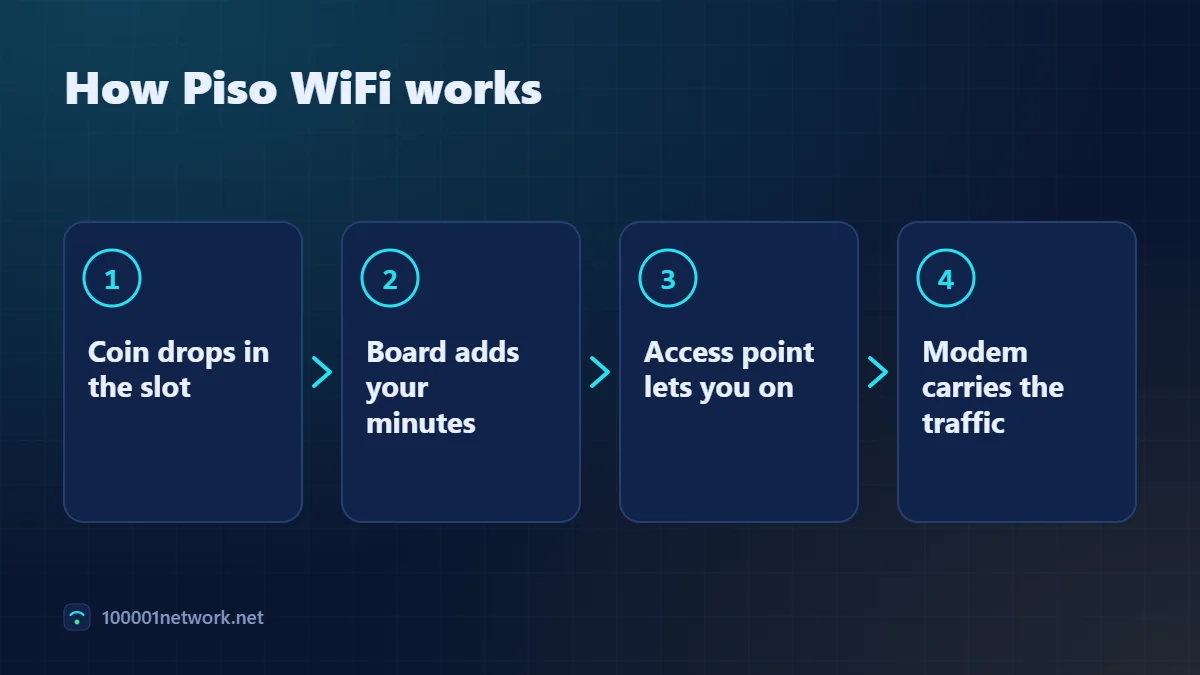
Every Piso WiFi vendo follows the same chain, whichever software runs it. Knowing that chain helps customers describe a problem clearly and helps owners spot which part failed.
- Coin slot: checks each coin and sends pulses to the board for the value it accepts.
- Controller board: a small computer such as a Raspberry Pi or Orange Pi, or a supported router, counts the pulses and turns them into minutes.
- Access point: broadcasts the open network, letting paid phones through and holding the rest at the portal.
- Internet line: a fiber or LTE modem carries the traffic out to the wider internet.
The board tells phones apart mainly by their MAC address, a hardware ID that each Wi-Fi chip shows to the network. That is why your time stays with the phone that paid, and why a phone that changes its ID can lose track of its minutes. When a balance hits zero, the board blocks that phone again and the portal asks for more coins.
For Owners: The Piso WiFi Admin Panel
Owners reach the Piso WiFi control panel by adding /admin to the portal address. Connect to the vendo by Wi-Fi or a LAN cable, turn off mobile data, and type 10.0.0.1/admin in the address bar. Customers can reach the same login form, which is exactly why the default password has to go on day one.
Defaults depend on the software. LPB is widely reported to use admin / 123456789. Older AdoPiSoft builds commonly use admin / admin, while newer builds vary. Wifi5 Soft is reported to use an owner account created at setup instead of a fixed pair. If none of these work, a seller or installer probably changed the login, which is good practice. Our 10.0.0.1 admin login and password guide has the full tables and reset steps.
Once inside, most panels share the same core tools, even when the menu names differ:
- Rates: how much time or data each coin buys.
- Vouchers: printed codes customers can use instead of coins.
- Pause rules: on or off, plus a time or count limit.
- Speed limits: per-user caps, so one heavy user does not slow everyone.
- Device bans: block a phone by its MAC address.
- Sales log: coin totals to compare with your cash box.
- Licence: status, expiry date and key activation.
Owner tip: the vendo’s Wi-Fi name and admin password live in the vendo panel, while your fiber or LTE modem has its own separate settings page. If the panel works but customers cannot browse, check the modem and your internet line before touching the vendo.
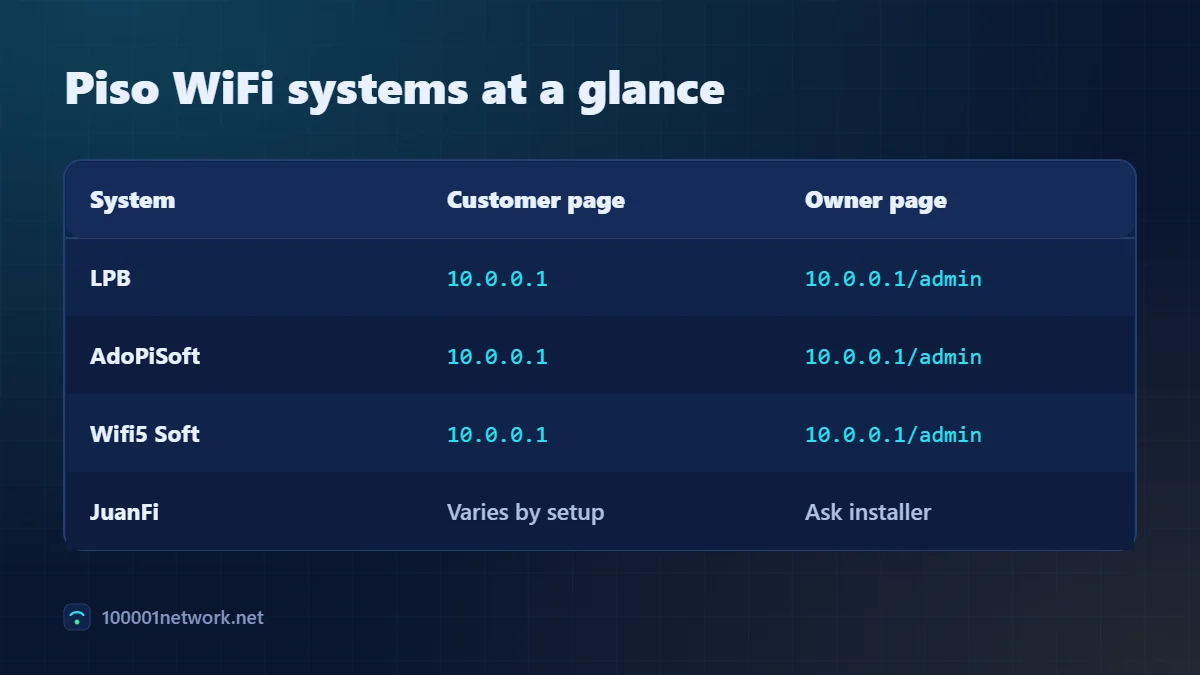
Piso WiFi Systems Compared: LPB, AdoPiSoft and More
Most Piso WiFi vendos in the country run one of a handful of software systems. They do the same basic job but differ in licences, supported hardware and how owners sign in. Details below come from vendor sites where they exist and from commonly reported setups where they do not, so check against your own version.
| System | Owner sign-in | Hardware | Licence |
|---|---|---|---|
| LPB | 10.0.0.1/admin; admin / 123456789 (reported) | Raspberry Pi, Orange Pi, Newifi, PC, TV box | ₱400 Lite or ₱700 Premium per year |
| AdoPiSoft | 10.0.0.1/admin; admin / admin on older builds | Raspberry Pi, Orange Pi, Newifi 3 D-2, PC | Paid plans plus a free Community Edition |
| Wifi5 Soft | 10.0.0.1/admin; owner account (reported) | Ask your seller | Expiry on dashboard (reported); price not public |
| JuanFi | Varies; described as MikroTik-based | MikroTik setups (reported) | Not verified; ask your installer |
LPB publishes peso prices, and the figures above are as listed on the official LPB site in October 2026, with promos often lower. AdoPiSoft is made by Flarego Technologies in Cebu and lists its plans in US dollars. For more depth, read our LPB setup and licence guide or the Wifi5 Soft owner guide.
Thinking of Starting Your Own Vendo?
A Piso WiFi vendo can be a small, steady business, but nobody can honestly promise a fixed income. Earnings depend on foot traffic, nearby competition, your rates and how reliable your internet is. Before buying anything, walk the area at different times of day and count the machines already there.
- A supported board, or a ready-made kit from a seller
- A programmable multi-coin slot and a stable power supply
- An access point or router to broadcast the customer Wi-Fi
- A locked, ventilated enclosure
- A software licence and a reliable fiber or LTE plan
- Local permits, such as a barangay clearance and a mayor’s permit
Because a vendo shares internet with the public, telecom rules may also apply, so check with the National Telecommunications Commission and your city or municipal hall. Our Piso WiFi vendo business guide covers parts, costs, locations and permits step by step.
Typical Rates (Examples Set by Owners)
There is no national Piso WiFi price list. Each owner sets rates in the admin panel, often to match nearby machines, so treat these as common examples rather than prices to expect everywhere.
| Coin | Example time | Note |
|---|---|---|
| ₱1 | 5 minutes | Some areas give more |
| ₱5 | 30 minutes | A common starter amount |
| ₱10 | 1 hour | Popular with students |
| ₱20 | 2 to 3 hours | Bigger coins often earn bonus time |
Some systems sell data instead of minutes. If the rates list shows MB or GB, you are buying a data allowance, not a timer.
Staying Safe on Public Wi-Fi
A Piso WiFi network is open to anyone nearby. The portal itself is a harmless local page, but the shared network around it calls for a few simple habits.
Stay safe on shared Wi-Fi:
- Join only the network name printed on the vendo, since look-alike names can be traps.
- Check for https:// before logging in to banks, e-wallets or social media.
- Never type your MPIN, one-time PIN or email password into a vendo page.
- Skip apps or APK files that promise free minutes or a “pause hack”.
- Owners: change the default admin password and keep the box locked.
Piso WiFi Glossary
New to the words people use around Piso WiFi vendos? Here is what each term means in plain language.
| Term | What it means |
|---|---|
| Vendo | The coin-operated box that sells Wi-Fi time |
| Portal | The page at 10.0.0.1 where you pay and check time |
| Captive portal | Any sign-in page shown before the internet opens |
| Admin panel | The owner’s settings page at 10.0.0.1/admin |
| Voucher | A prepaid code you type instead of inserting coins |
| Pause | Freezes your remaining time until you resume |
| MAC address | The hardware ID the vendo uses to recognise your phone |
| Random MAC | A privacy setting that changes that ID per network |
| Access point | The device that broadcasts the vendo Wi-Fi |
| Sub-vendo | An extra coin box that shares one main unit |
| Licence | The paid key that unlocks the vendo software |
| Rates | The owner’s list of how much time each coin buys |
| SSID | The Wi-Fi network name you pick from your list |
All Our Piso WiFi Guides in One Place
Each topic above has a full guide with step-by-step instructions, tables and fixes. Pick the one that matches your Piso WiFi question.
- 1.0.0.0.1 and 10.0.0.1 login help: the right address, every common typo, and what to do when the portal will not open.
- Customer portal guide: connecting on Android and iPhone, paying with coins or vouchers, and reading your dashboard.
- Pause time guide: how to pause and resume, why time disappears, and pause rules for owners.
- Admin login and passwords: reported defaults by system, factory resets and a security checklist.
- LPB Piso WiFi guide: supported hardware, setup, rates, pause settings and Lite vs Premium licences.
- Wifi5 Soft guide: the account-based owner login, vouchers, licence status and fixes.
- Vendo business guide: parts, software, internet plans, locations, permits and what affects earnings.
Spotted something out of date, or have a question we did not answer? Read how we write our guides or send a note through our contact form.
Mabilis na gabay (Taglish):
- Mag-connect sa Wi-Fi ng vendo, tapos i-off muna ang data mo.
- Walang lumabas na page? I-type ang
10.0.0.1sa address bar, hindi 1.0.0.0.1. - Pindutin muna ang Insert Coin bago maghulog, saka Done Paying.
- Aalis ka sandali? I-Pause ang oras, at mag-Resume gamit ang parehong phone.
- Ikaw ang may-ari? Pumunta sa
10.0.0.1/adminat palitan agad ang password.
FAQs about Piso WiFi
What is Piso WiFi?
Piso WiFi is coin-operated internet sold by a vendo box in the Philippines. You join its open network, pay on the 10.0.0.1 page with coins, a voucher or sometimes an e-wallet, and your phone gets a set amount of time. When that time runs out, access stops until you pay again.
How much does Piso WiFi cost?
Every owner sets their own rates, so prices differ from place to place. A common pattern is ₱1 for about 5 minutes, ₱5 for 30 minutes and ₱10 for an hour, often with bonus time on bigger coins. Check the rates on the portal or the sticker on the vendo before paying.
Why won’t the Piso WiFi page open on my phone?
Usually mobile data, a VPN or Private DNS is pulling your phone away from the vendo, or you joined the wrong network. Switch those off, rejoin the vendo Wi-Fi and type http://10.0.0.1 in the address bar. If nobody nearby can connect, the vendo may be offline.
Can I pause my time and use it later?
Yes, if the owner allows it. Open the portal while your time is running and tap Pause, then tap Resume later on the same phone. Owners can limit how long or how often you pause, and paused time can expire, so ask about the rules before you leave.
Is 1.0.0.0.1 the same as 10.0.0.1?
No. 1.0.0.0.1 has five numbers, so it is not a valid address and your browser treats it as a search. The vendo portal is 10.0.0.1, with four numbers and three dots. Owners add /admin to the end to reach the settings page.
What is the default admin password for a vendo?
It depends on the software. LPB is widely reported to use admin / 123456789, older AdoPiSoft builds often use admin / admin, and Wifi5 Soft reportedly uses an owner account. Only log in to a vendo you own or manage, and change the default straight away.
Is Piso WiFi safe to use?
The portal is safe, since it is a local page on the vendo. The open network around it is the bigger risk. Join only the network named on the machine, use https sites for banking and e-wallets, and never share your MPIN or one-time PIN with anyone.
Final Word
Piso WiFi is simple once you know the two addresses: 10.0.0.1 to pay, pause and check your time, and 10.0.0.1/admin for owners. Bookmark this page and jump to the guide that fits whenever a new question comes up.