Quick summary: Our disclaimer in eight honest points.
- Our guides are general information for Piso WiFi customers and vendo owners in the Philippines.
- We are not affiliated with LPB, AdoPiSoft, Wifi5 Soft, JuanFi, TP-Link, PLDT, Globe, Converge, any ISP or any vendo seller.
- Default passwords, menu names and limits are commonly reported and may differ on your unit.
- We label facts as official, commonly reported, version dependent or unverified.
- Changing settings or doing a factory reset is at your own risk.
- We cannot restore lost time, credits or income.
- Permit, tax and NTC details are general, so confirm them with the right office.
- Ads, outside links, the address fixer and our pictures have limits. Report errors on our contact page.
Disclaimer pages are often long and full of legal words, so we kept this one plain and easy to read on a phone. Last updated: October 30, 2026. 100001network.net is an independent information website. The guides here are written to help Piso WiFi customers and vendo owners in the Philippines, and they are provided for general information only. This disclaimer explains what that means in practice.
What This Disclaimer Covers
This disclaimer applies to everything on 100001network.net: the home page, every guide in our Piso WiFi guides hub, the tables inside those guides, the address fixer tool and all illustrations. Read it together with our terms of use, which set the basic rules for using the site.
We are a small, independent team. You can read who we are and how we research each topic on the about 100001 Network page. We have no shop, office address or phone line to publish, so the contact form is the one official way to reach us.
| Part of the site | What it is | Main limit |
|---|---|---|
| Guides and articles | Step-by-step help | May not match your exact unit |
| Tables of defaults | Commonly reported values | Can change by version or installer |
| Address fixer | A typo checker | Gives a suggestion only |
| Illustrations | Drawn pictures | Not real vendo screens |
| Ads and outside links | Third-party content | Not reviewed or endorsed by us |
No Affiliation Disclaimer: Brands, ISPs and Sellers
We are not affiliated with, endorsed by or sponsored by LPB Piso WiFi, AdoPiSoft, Wifi5 Soft, TP-Link, any internet service provider or any vendo seller. The disclaimer is broad on purpose, because readers sometimes mistake a help site for official support. The list below covers the names we mention most.
- LPB Piso WiFi and its distributors
- AdoPiSoft, formerly known as Ado Piso WiFi
- Wifi5 Soft and JuanFi
- TP-Link and other router or modem makers
- PLDT, Globe, Converge and other internet providers
- Any vendo seller, installer, reseller or repair shop
None of these companies has reviewed our guides, and none pays us to mention it. We do not sell vendo machines, licences, coin slots or vouchers. For official help, go to the vendor directly, such as the official LPB website for LPB licences and features.
Trademark Disclaimer
All trademarks and brand names belong to their respective owners and appear here only so readers can find the right instructions. Mentioning a name does not mean its owner supports this site, and we do not use any brand logo in our images.
Accuracy Disclaimer: Passwords, Menus and Limits
Default usernames, passwords, menu names and limits described on this site are commonly reported values. They can differ between software versions, resellers and individual machines, and owners can change them at any time. Where sources disagree we say so, but we cannot guarantee that every detail matches your device.
This part of the disclaimer matters most for owners. A reseller may install an older build, an installer may change the login on day one, and an owner can switch features on or off at any time. The table shows what differs most, with real examples.
| Type of info | Why it may differ | What to do |
|---|---|---|
| LPB default login | Widely reported but not published officially; often changed | Use the login your installer gave you |
| AdoPiSoft login | Older builds reported as admin / admin; newer builds differ | Check your software version |
| Wifi5 Soft sign-in | Reportedly an email account, not a fixed default (unverified) | Use the email you registered |
| Menu names | AdoPiSoft pause setting is reported under two menus | Look in session or portal settings |
| Pause limits | LPB maximum reported differently; AdoPiSoft limits pause count, not minutes | Read the portal or ask the owner |
| Coin rates | Set by each owner; ₱1 for 5 minutes is just an example | Check the rate on the portal |
| Reset hold time | Reports range from about 5 to 30 seconds | Follow your device manual |
| Licence prices | Vendors change prices and run promos | Check the official site |
If your screen looks different, trust your device, your installer and official documentation over us. Our 10.0.0.1 admin login guide lists reported defaults with the same warnings, the Wifi5 Soft guide explains its account sign-in, and the LPB Piso WiFi guide shows where pause settings usually sit.
How We Label Facts in Our Guides
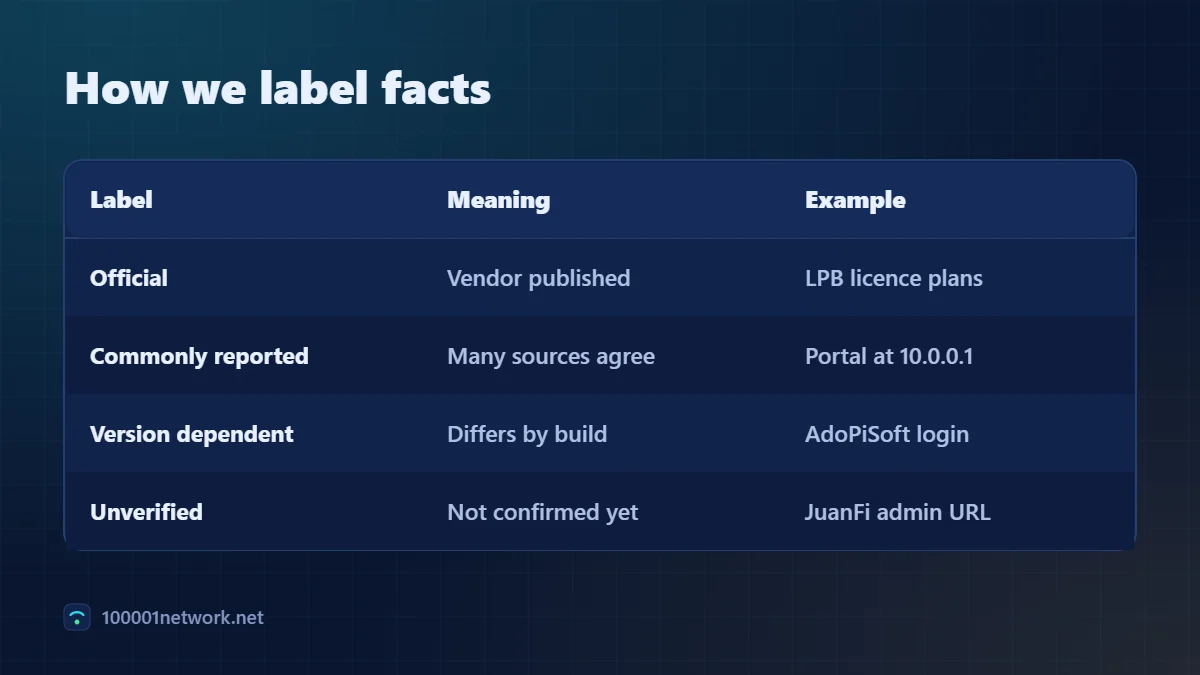
To be open about how sure we are, we use four labels. Sometimes a label sits in a table. Other times it appears as a phrase like “commonly reported”, “on most builds” or “check your version”. This section of the disclaimer explains what each label means and how much weight to give it.
| Label | What it means | Example from our guides | How to use it |
|---|---|---|---|
| Official | Published by the vendor or a government body | LPB licence plans; AdoPiSoft cloud manager sign-in with email and password | Reliable, but plans and prices change |
| Commonly reported | Many sources agree, but the vendor does not publish it | Customer portal at 10.0.0.1; the LPB default admin login | Usually right; confirm on your unit |
| Version dependent | True on some builds or models only | AdoPiSoft default login and pause menu location | Check your software version first |
| Unverified | One source only, or sources conflict | JuanFi admin at 10.0.0.1/admin; NTC registration for operators | Treat it as a lead, not a fact |
A few rules sit behind the labels. We do not invent statistics, prices or menu paths. Peso rates are labelled as examples set by the vendo owner. When two good sources disagree, we show both instead of quietly picking one. And we never claim to have tested machines we have not tested.
Risk Disclaimer: Settings and Factory Resets
Changing vendo or router settings, performing a factory reset or editing network options can interrupt service or erase your configuration. Only make changes to equipment you own or manage, and keep a note of your current settings first. We are not responsible for any loss that results from using our guides.
Warning: A factory reset usually wipes the admin password, Wi-Fi name, coin rates, vouchers and sub-vendo setup, and every customer loses their connection while the unit restarts. Never log in to, reset or change a vendo or router that is not yours. Accessing someone else’s system without permission can break the law, including the Cybercrime Prevention Act of 2012.
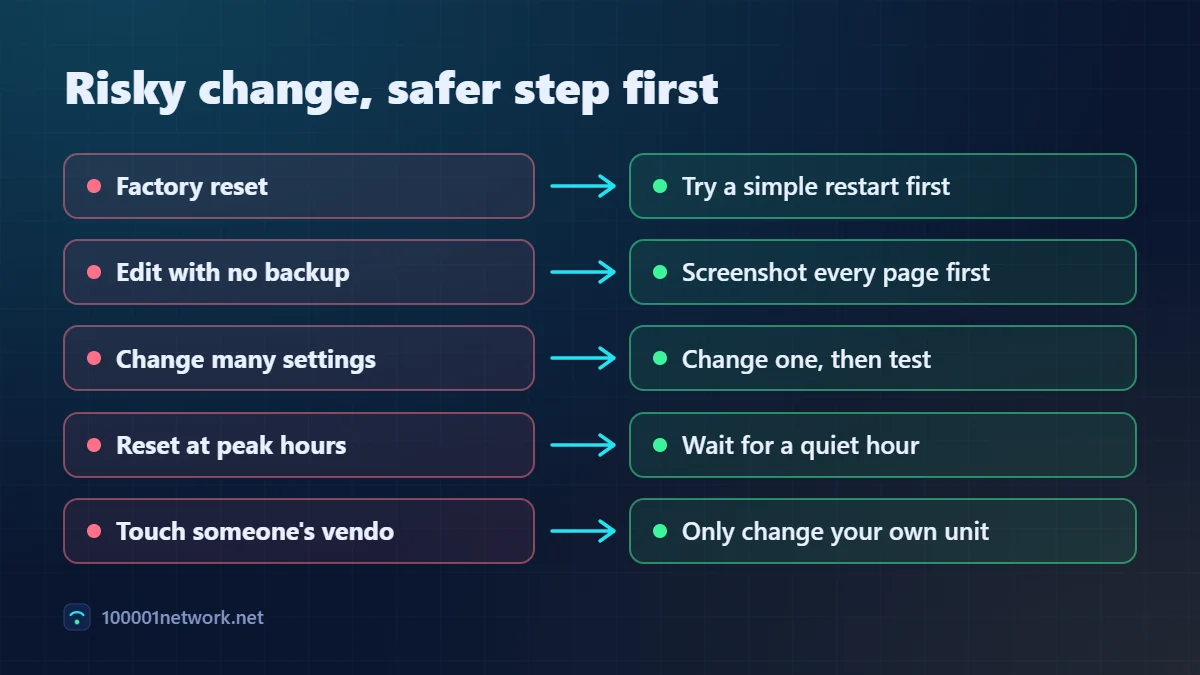
This risk disclaimer is not meant to scare you away from managing your own vendo. If you need to change something on your own unit, these steps lower the chance of a long outage or lost settings.
- Confirm the device is yours, or that the owner asked you to manage it.
- Screenshot every settings page you plan to touch, including rates, vouchers and the Wi-Fi name.
- Write down the admin login and keep it private, away from the machine.
- Use a backup or export option if your software has one, and save the file off the device.
- Pick a quiet hour so no paid session is cut short.
- Change one setting at a time, then test it with a phone on the vendo Wi-Fi.
- Try a simple restart before anything bigger, and treat a factory reset as the last resort.
- If you get stuck, contact your installer or the vendor’s official support.
No Responsibility for Lost Time, Credits or Income
We do not own, run or have access to any Piso WiFi machine. We cannot see your session, add minutes, refund coins or unlock a voucher. Under this disclaimer, we are not responsible for lost time, coins, credits or income, whether you are a customer or an owner. Here is who can actually help.
| Problem | Who can actually help |
|---|---|
| Coin inserted but no time added | The vendo owner |
| Paused minutes are gone | The vendo owner, who sets the pause rules |
| Voucher code does not work | The person or shop that sold it |
| Internet slow or down for everyone | The owner, then their ISP |
| Licence or activation problem | The software vendor |
| Sales lost during downtime | The owner’s installer or vendor |
Customers can read our pause time guide to see why paused minutes can expire, or the customer portal guide to check remaining time. Those pages explain what usually happens, but only the owner can fix your session.
Owners, the same rule covers business choices. If you buy hardware, a licence or an internet plan after reading our Piso WiFi vendo business guide, the decision and the result are yours. Compare quotes, talk to other owners and read the official sites first.
Legal Disclaimer: Permits, Tax and NTC
Some guides mention registering a business name with the DTI, registering with the BIR for taxes, and getting a business permit from your city or municipality, often after a barangay clearance. That is only a general outline. Requirements, fees and forms differ between LGUs and change over time.
This legal disclaimer is simple: everything on this site is general information, not legal, tax or financial advice. Some sources say Piso WiFi operators must register with the National Telecommunications Commission. We have not confirmed that, so we label it unverified. Check the NTC website or its regional office, and confirm every permit with the office that issues it.
- DTI: business name registration
- BIR: tax registration, receipts and filing
- City or municipal hall (LGU): business or mayor’s permit
- Barangay hall: barangay clearance
- NTC: whether telecom rules apply to your setup
Ads and External Links Disclaimer
The site may display advertising and may contain links to other websites. Ads are clearly separate from our guides and do not change what we recommend. We are not responsible for the content of external sites. This disclaimer also covers any page you reach by clicking away from 100001network.net.
Ads may come from third-party networks that use cookies to choose what you see. Read how Google uses cookies in advertising, and see our privacy policy for your choices. An ad is never our recommendation, so be wary of any ad that promises free Piso WiFi time, hacked vouchers or unlock tools. We never publish tricks like that.
Outside pages can change, move or go offline without notice. Check the address bar before you type anything, and remember that no honest guide will ask for your admin password, GCash PIN or one-time code.
Address Fixer Disclaimer: Suggestions Only
Our home page has a small address fixer. You paste what you typed, such as 1.0.0.0.1 or 10.0.0.0.1/admin, and it suggests a corrected address with a short note. The check runs in your browser. Its output is a suggestion based on common typos, not a promise that the address will open.
The tool assumes your vendo uses 10.0.0.1, as most do, but your network may use a different gateway. If the suggestion does not load, look for the gateway address in your phone’s Wi-Fi details and try that. Our 10.0.0.1 login help page explains how.
- It cannot tell whether you are connected to the vendo Wi-Fi.
- It cannot check whether a vendo is online or broken.
- It does not know which software your vendo runs.
- It cannot log you in, reset a password or add time.
Image Disclaimer: Illustrations, Not Real Screens
The images in our guides are drawn illustrations made for this site. They are not screenshots from a real vendo or from any vendor’s software. They show the general idea, like where a button usually sits, but real portals look different from brand to brand and owner to owner.
Any peso amount, time limit or login shown in an image is an example only. Please do not use our pictures as proof of what a vendo should show. This disclaimer treats every picture on the site the same way.
Ang disclaimer na ito sa madaling salita:
- Independent kami. Hindi kami konektado sa LPB, AdoPiSoft, Wifi5 Soft o kahit anong ISP.
- Ang default password at menu sa guide ay “commonly reported” lang. Puwedeng iba sa vendo mo.
- Bago mag-reset, i-screenshot muna ang settings. Last resort lang ang factory reset.
- Nawala ang coins o oras mo? Ang may-ari ng vendo ang kausapin.
- May mali sa guide? Sabihan kami sa contact page.
Errors, Corrections and Updates
If you think something on the site is wrong or out of date, please tell us through the contact page so we can review it. A clear report helps us check and fix things faster, so please include these details.
- The page address and the section that seems wrong.
- The vendo software or router model, and the version if you can see it.
- What your screen shows instead, described in words.
- Where you found the correct information, such as an official page.
Please do not send admin passwords, voucher codes, GCash details or photos with personal information. We do not need any of them to check a guide. When we confirm an error, we correct the page and update its date.
Changes to This Disclaimer
We may update this disclaimer as the site grows, for example when we add a new tool or type of guide. The “Last updated” date at the top shows when it last changed, and the updated disclaimer applies to your later visits.
FAQs About This Disclaimer
Is 100001 Network part of LPB, AdoPiSoft or Wifi5 Soft?
No. As this disclaimer explains, we are an independent help site with no link to LPB, AdoPiSoft, Wifi5 Soft, JuanFi, TP-Link or any internet provider. No brand has approved our guides or pays us. For official support, licences or warranty claims, contact the vendor or the shop that sold you the machine.
Why does the disclaimer say default passwords may be wrong?
Default logins are commonly reported values, not promises. Installers often change them, and newer software builds can use different ones. AdoPiSoft is a good example, since older and newer builds are reported to use different logins. The login your installer gave you always beats what any website says.
Can you refund my coins or restore paused time?
No. We do not run any vendo and cannot see or change customer sessions. If a coin did not register or paused minutes disappeared, talk to the vendo owner. They set the pause rules and are the only ones who can check the sales log and add time.
Is it safe to factory reset my vendo after reading a guide?
Our risk disclaimer applies here. Reset only a unit you own, and save your settings first, because a reset usually erases the admin password, rates, vouchers and Wi-Fi name. Try a simple restart first, check your manual for the button hold time, and ask your installer if unsure.
Do I need an NTC permit to run a Piso WiFi vendo?
We do not know for sure. Some sources say operators must register with the NTC, but we have not confirmed it, so we label that claim unverified. Ask the NTC directly, along with the DTI, BIR and your LGU, before you start the business.
Are the pictures on this site real vendo screenshots?
No. Under our image disclaimer, every picture is a drawn illustration made for this site. It shows the general layout or idea, not a real portal. Colors, button names, rates and logins on your own vendo will look different, and any amount shown is an example.
How do I report a mistake under this disclaimer?
Use the form on our contact page. Tell us the page, the section, your vendo software or router model and what your screen shows. Please leave out passwords and personal details. We review every report and correct the guide when we can confirm the error.
Final Word
This disclaimer comes down to one idea: use our guides as a helpful map, then check your own device, your installer and official sources before you change anything. We will keep labelling facts honestly and fixing mistakes when readers point them out. For the basics, head back to our 1.0.0.0.1 login guide.